

Add
Adds two numbers, whole or decimal.
Add adds two numbers and gives you the sum. It works with whole numbers and decimals alike. Use it for totals, for counters in a loop (for example counter + 1), or to add a fee to an amount.
Add the action
In the Process Designer toolbox, open Numerical and pick Add (or type Add in the search box).
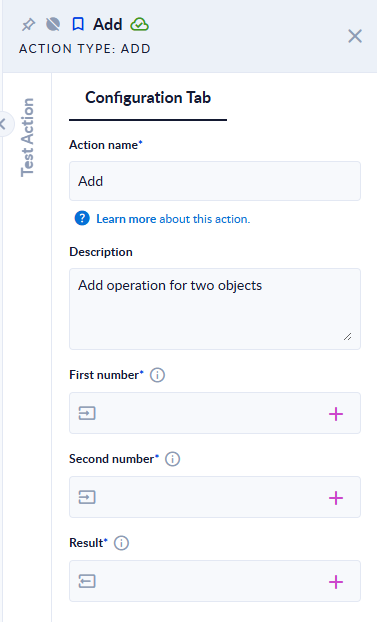
Inputs and outputs
| Field | Direction | Type | Required | What to put / what you get |
|---|---|---|---|---|
| First number | Input | Number (whole or decimal) | Yes | The first number. |
| Second number | Input | Number (whole or decimal) | Yes | The number to add to it. |
| Result | Output | Number (whole or decimal) | Yes | The sum. |
Example
| First number | Second number | Result |
|---|---|---|
2 | 3 | 5 |
0.1 | 0.2 | 0.3 |
1.5 | 2.5 | 4 |
-7.25 | 3 | -4.25 |
Good to know
- The sum is exact for decimals (
0.1+0.2is0.3, with no rounding error). - When the sum is a whole number, you get a whole number (
1.5+2.5gives4, not4.0), so you can map Result to an Integer variable. - To increment a counter, map the same variable to First number and Result, and put
1in Second number. - Use a dot for decimals. A comma is read as a thousands separator and ignored:
1,5+1gives16. - Text that is not a number stops the step with
Invalid input.; an empty input stops it withInput was null. Please, fill it.