

Arithmetic Mean
Returns the average (arithmetic mean) of the numbers in a list.
The Arithmetic Mean action returns the average of the numbers in a list: their sum divided by how many there are.
Add the action
In the Process Designer toolbox, open List, then Numeric, and pick Arithmetic Mean (or type Arithmetic Mean in the search box).
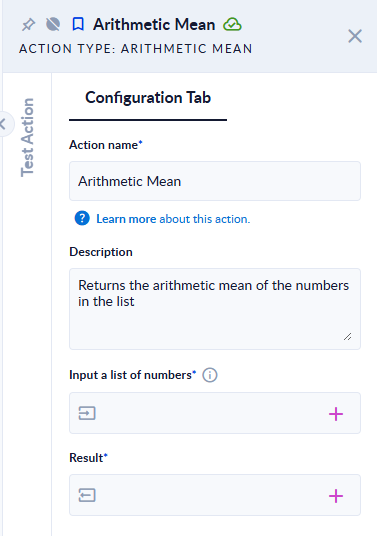
Inputs and outputs
| Field | Direction | Type | Required | What to put / what you get |
|---|---|---|---|---|
| Input a list of numbers | Input | List of numbers | Yes | The numbers to average, for example [2,4,6]. |
| Result | Output | Number | Yes | The average. A whole number when the average is whole, otherwise a decimal number. |
Example
| Input a list of numbers | Result |
|---|---|
[2,4,6] | 4 |
[1,2] | 1.5 |
[1,2,2] | 1.6666666666666667 (not rounded) |
[] (empty list) | NaN — the step does not fail |
Good to know
- The result is not rounded. Use Round afterwards if you need a fixed number of decimals.
- An empty list does not fail the step: Result is
NaN("not a number"). If the list can be empty, check it first with Has Elements or Length. - Numbers stored as text (
"3") are accepted; any other text makes the step fail with The input was not a number. Please try again.