

Concatenate
Joins two lists into one new list: the elements of the first list followed by those of the second.
The Concatenate action (List) creates a new list that contains all elements of the first list followed by all elements of the second list. It works with simple lists and with lists of data models. The two input lists are not changed.
This action was previously called Concatenate Lists. To join two pieces of text, use the String Concatenate action instead.
Add the action
In the Process Designer toolbox, open List and pick Concatenate (or type Concatenate in the search box — make sure you pick the one in the List folder).
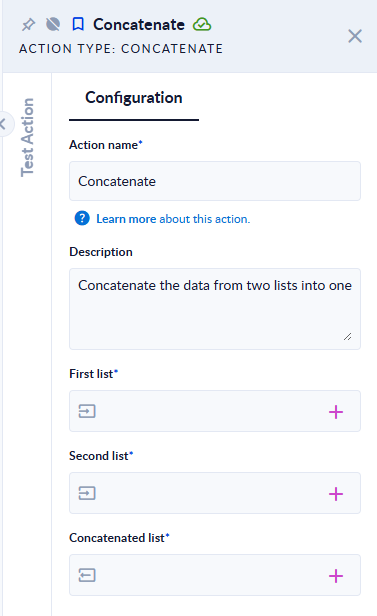
Inputs and outputs
| Field | Direction | Type | Required | What to put / what you get |
|---|---|---|---|---|
| First list | Input | List of any type | Yes | The elements that come first. |
| Second list | Input | List of any type | Yes | The elements appended after the first list. |
| Concatenated list | Output | List | Yes | The combined list. |
Example
| First list | Second list | Concatenated list |
|---|---|---|
[1,2] | [2,3] | [1,2,2,3] (duplicates are kept) |
[{"id":1}] | [{"id":2}] | [{"id":1},{"id":2}] |
["a"] | [1,{"id":2}] | ["a",1,{"id":2}] |
[] | [1] | [1] |
[] | [] | [] |
Good to know
- Order is preserved: first-list elements, then second-list elements.
- Duplicates are not removed. Use DeDuplicate or Find Duplicates afterwards if you need unique values.
- An empty list (or a list variable with no value) on either side simply contributes no elements.
- To merge more than two lists, chain several Concatenate actions. To add a single element, use Add.