

Get Element
Returns the element at a given position (index, starting from 0) in a list.
The Get Element action returns the element found at a given position in a list. Positions start at 0: the first element is at index 0, the second at 1, and so on.
Add the action
In the Process Designer toolbox, open List and pick Get Element (or type Get Element in the search box).
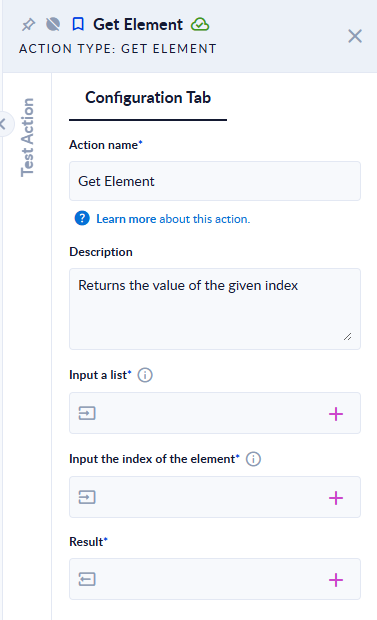
Inputs and outputs
| Field | Direction | Type | Required | What to put / what you get |
|---|---|---|---|---|
| Input a list | Input | List of any type | Yes | The list to read from, for example [10,20,30]. |
| Input the index of the element | Input | Integer | Yes | The position of the element, starting from zero. |
| Result | Output | Same type as the list elements | Yes | The element at that position. For a list of data models, map a variable of that data model. |
Example
| Input a list | Input the index of the element | Result |
|---|---|---|
[10,20,30] | 0 | 10 |
["a","b","c"] | 2 | c |
[{"id":1,"name":"Ann"},{"id":2,"name":"Bob"}] | 1 | {"id":2,"name":"Bob"} |
["a","b","c"] | 3 | The step fails: Index exceeds the list's size. |
[] | 0 | The step fails: Index exceeds the list's size. |
["a","b","c"] | -1 | The step fails (negative indexes are not allowed; -1 does not mean "last element"). |
Good to know
- Indexes are zero-based. To get the last element, compute length − 1 with Length and Subtract, or use Last N Elements with
1. - An index equal to or greater than the list length, or any index on an empty list, makes the step fail.