

Remove
Removes the first occurrence of a value or object from a list.
The Remove action deletes one element from a list: the first element equal to the value you give. The same list variable is used as input and output, so after the step it holds the shorter list.
Add the action
In the Process Designer toolbox, open List and pick Remove (or type Remove in the search box).
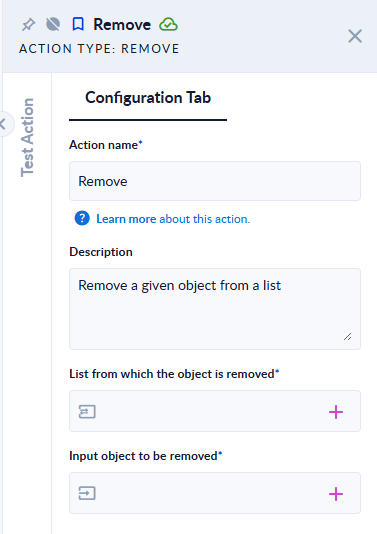
Inputs and outputs
| Field | Direction | Type | Required | What to put / what you get |
|---|---|---|---|---|
| List from which the object is removed | Input and output | List of any type | Yes | The list variable to change. After the step, the same variable contains the list without the removed element. |
| Input object to be removed | Input | Any value (text, number, Boolean, Object (JSON), data model) | Yes | The value to remove. |
Example
| List (before) | Input object to be removed | List (after) |
|---|---|---|
["a","b","c","b"] | b | ["a","c","b"] (only the first b is removed) |
[1,2,3] | 2 | [1,3] |
[1.5,2] | 1.5 | [2] |
[true,false] | false | [true] |
[{"id":1,"n":"A"},{"id":2,"n":"B"}] | {"n":"B","id":2} | [{"id":1,"n":"A"}] |
[1,2,3] | 9 | [1,2,3] (nothing to remove, no error) |
Good to know
- Only the first match is removed. To remove every occurrence, use Simple Filter with
"KeepIfTrue": false, or call Remove in a loop until Contains returnsfalse. - If the value is not found, the list stays as it is and the step succeeds.
- Objects and data models must match on all properties; the order of the properties does not matter.
- An empty Input object to be removed makes the step fail with Input was null. Please, fill it.
- Map a variable to the list field, because the result is written back to it.