

Last N Elements
Returns the last N elements of a list, optionally sorted.
The Last N Elements action takes the last N elements of a list and returns them as a new list. You can also have those N elements sorted in the result. The input list is not changed.
Add the action
In the Process Designer toolbox, open List and pick Last N Elements (or type Last N in the search box).
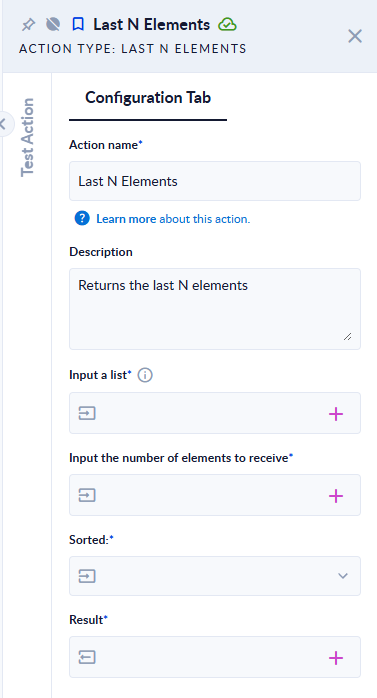
Inputs and outputs
| Field | Direction | Type | Required | What to put / what you get |
|---|---|---|---|---|
| Input a list | Input | List of any type | Yes | The source list, for example [5,3,9,1]. |
| Input the number of elements to receive | Input | Integer | Yes | N, how many elements to take from the end. |
| Sorted: | Input | Option | Yes | Unsorted (keep the original order), Sorted ascendingly or Sorted descendingly. |
| Result | Output | List | Yes | The last N elements. |
Example
| Input a list | N | Sorted: | Result |
|---|---|---|---|
[5,3,9,1] | 2 | Unsorted | [9,1] |
[5,3,9,1] | 3 | Sorted ascendingly | [1,3,9] |
[5,3,9,1] | 3 | Sorted descendingly | [9,3,1] |
[5,3] | 10 | Unsorted | [5,3] (fewer elements than N is fine) |
[5,3] | -1 | Unsorted | [] |
Good to know
The action takes the last N elements first, and only then sorts those N. It does not return the N smallest or largest values of the whole list. To get the N largest values, Sort the list ascending first and then use Last N Elements.
- If N is larger than the list, you get the whole list; if N is
0or negative, you get an empty list. No error in either case. - The elements keep their original order with Unsorted (the last element of the list is also the last in the result).
- Sorting compares numbers as numbers when every element is a number; otherwise all elements are compared as text. A list of objects comes back as a list of texts when you choose a sorted option; use Unsorted for lists of objects or data models.