

List Difference
Returns the items of the first list that are not in the second list.
List Difference returns the items of the first list that do not appear in the second list (first minus second). Use it to find new records since the last export, invoices not yet paid, or users missing from a group.
Add the action
In the Process Designer toolbox, open Community-Made and pick List Difference (or type List Difference in the search box).
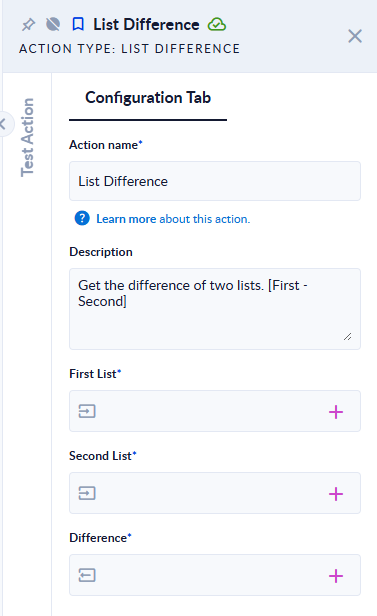
Inputs and outputs
| Field | Direction | Type | Required | What to put / what you get |
|---|---|---|---|---|
| First List | Input | List (any type) | Yes | The list to start from. Map a list variable. |
| Second List | Input | List (any type) | Yes | The items to take out. Map a list variable. |
| Difference | Output | List (any type) | Yes | The items of First List that are not in Second List, each one once, in the order of First List. |
Example
| First List | Second List | Difference |
|---|---|---|
[1, 2, 2, 3, 4] | [3, 4, 5] | [1, 2] |
["apple", "Banana", "cherry"] | ["banana"] | ["apple", "Banana", "cherry"] |
Good to know
- The order of the lists matters: items that are only in Second List (
5above) are not returned. Swap the lists to get them. - Duplicates are removed:
2appears twice in the first list but once in the result. - Text is compared exactly, case included:
bananadoes not removeBanana. - A list that is not set stops the step with
Input Error: The first list can't be null !(or second).
Related actions
Creator
Franck, The Productivity Lab