

Sort
Sorts a simple list (numbers or text) in ascending or descending order.
The Sort action sorts a simple list of numbers or text in ascending or descending order. The same list variable is used as input and output, so after the step it holds the sorted list. To sort a list of data models by one or more of their fields, use Sort Data Model.
Add the action
In the Process Designer toolbox, open List and pick Sort (or type Sort in the search box).
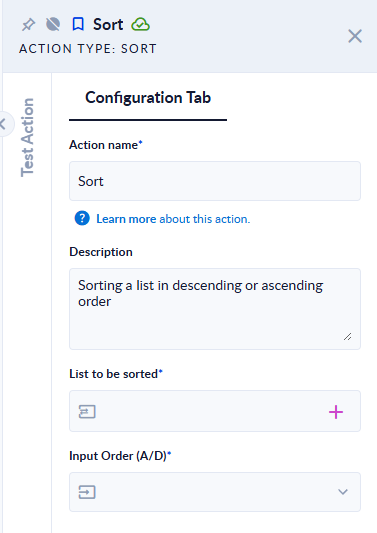
Inputs and outputs
| Field | Direction | Type | Required | What to put / what you get |
|---|---|---|---|---|
| List to be sorted | Input and output | List of numbers or text | Yes | The list variable to sort. After the step, the same variable contains the sorted list. |
| Input Order (A/D) | Input | Option | Yes | Ascending Order (smallest / A first) or Descending Order (largest / Z first). |
Example
| List to be sorted (before) | Input Order (A/D) | List to be sorted (after) |
|---|---|---|
[10,2,33,1] | Ascending Order | [1,2,10,33] |
[10,2,33,1] | Descending Order | [33,10,2,1] |
[1.5,2.25,0.5] | Ascending Order | [0.5,1.5,2.25] |
["pear","Apple","banana","apple"] | Ascending Order | ["apple","Apple","banana","pear"] |
["b","a","b"] | Descending Order | ["b","b","a"] |
[true,false,true] | Ascending Order | [false,true,true] |
Good to know
Do not mix whole and decimal numbers, or numbers and text, in the same list. For example [1.5,-2,1], ["1.5","-2","1"] or [3,"a",1] does not fail the step, but the list variable comes back empty. Check the result (for example with Length) if your list can contain such values.
- Text is sorted alphabetically without regard to case (
appleandAppleend up next to each other). - Duplicates are kept.
- An empty list makes the step fail with Input list was not fill right. You can not add data models and primitives to the same list. Check the list with Length first if it can be empty.
- A list of objects is sorted by their full text, and the elements come back as text, not as objects. Use Sort Data Model for lists of objects.