

Sum
Adds up all the numbers in a list and returns the total.
The Sum action adds up every number in a list and returns the total. Use it to total amounts, quantities or scores that you collected in a list variable.
Add the action
In the Process Designer toolbox, open List, then Numeric, and pick Sum (or type Sum in the search box).
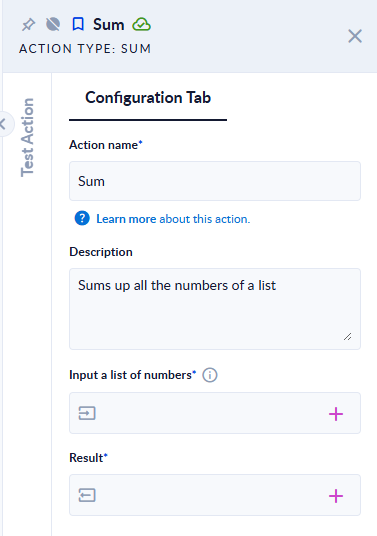
Inputs and outputs
| Field | Direction | Type | Required | What to put / what you get |
|---|---|---|---|---|
| Input a list of numbers | Input | List of numbers | Yes | The numbers to add, for example [1,2,3]. |
| Result | Output | Number | Yes | The total. A whole number when the total is whole, otherwise a decimal number. |
Example
| Input a list of numbers | Result |
|---|---|
[1,2,3] | 6 |
[1.5,2.25,-1] | 2.75 |
["10","2.5"] (numbers stored as text) | 12.5 |
[] (empty list) | 0 |
[1,"abc"] | The step fails: The input was not a number. Please try again. |
Good to know
- Numbers stored as text (
"10") are converted and added. - An empty list returns
0; it does not fail. - Any element that is not a number makes the step fail.
- Calculations use decimal numbers (double precision), so very large totals can lose precision.