

Extract Embedded Files
The Extract Embedded Files action extracts embedded files from a .pdf.
The Extract Embedded Files action extracts embedded files from a .pdf.
How to configure the Extract Embedded Files action?
1. Create a process and give it a name.
2. Drag the Extract Embedded Files action to the canvas and link it to the other actions.
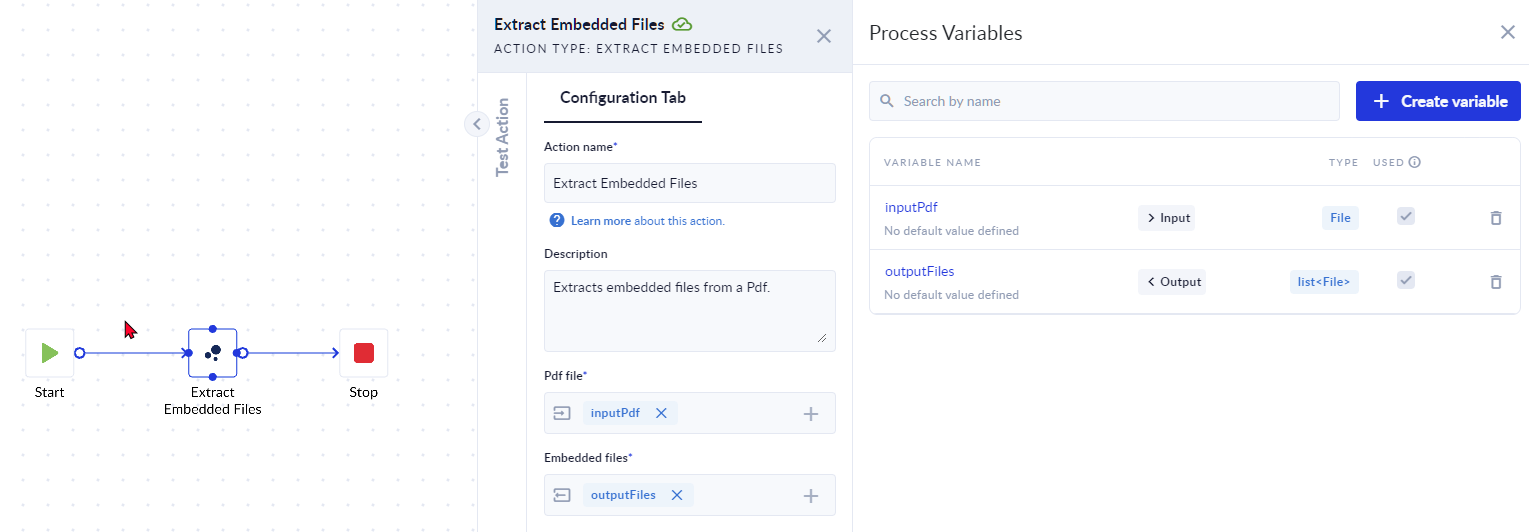
3. Create the variables needed for the configuration of the action, and then add them to the configuration panel:
Inputs & Outputs
- [ I ] Pdf file: Filerepresenting the input pdf file that contains embedded files.
- [ O ] Embedded files: List<File> representing the list of the embedded files extracted from the input pdf.
4. Save, Validate and Run the process.
5. You will be prompted to add the file for the input variable. Drag or upload the file and click Run.
6. To verify the process click Check Instances.
7. In the Output section, you will see the details of the embedded files. Download to access each file.
Area Mapper
The Area Mapper action facilitates mapping values found in specific areas of a document to corresponding keys. It involves defining configurations to…
Acroform Insert Image
The Acroform Insert Image action inserts an image into a PDF file to a location where a marker of type Acroform Field Name is set. The image will be…