

Split
Splits a text into a list of pieces wherever a separator appears.
Split cuts a text into a list of pieces wherever a separator appears, for example a comma-separated line into its values. Use the list with For Each or the List actions.
Add the action
In the Process Designer toolbox, open String and pick Split (or type Split in the search box).
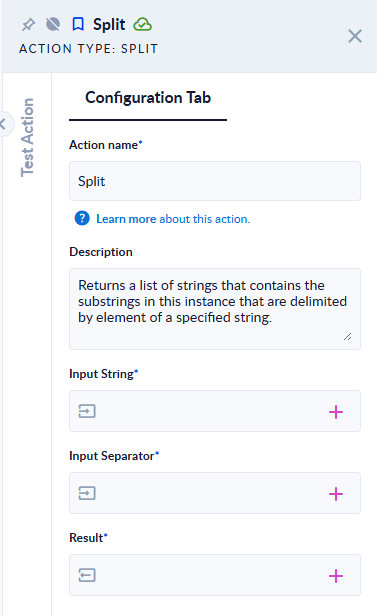
Inputs and outputs
| Field | Direction | Type | Required | What to put / what you get |
|---|---|---|---|---|
| Input String | Input | Text | Yes | The text to split. |
| Input Separator | Input | Text | Yes | The text that separates the pieces. It can be longer than one character. |
| Result | Output | List of Text | Yes | The pieces, in order, without the separator. |
Example
| Input String | Input Separator | Result |
|---|---|---|
red,green,,blue | , | ["red", "green", "", "blue"] |
a, b, c | , | ["a", "b", "c"] |
a;b; | ; | ["a", "b", ""] |
abc | ; | ["abc"] |
aXbxc | x | ["aXb", "c"] |
a b | (empty) | ["a b"] |
Good to know
- Empty pieces are kept. Two separators in a row, or a separator at the start or end, give an empty text in the list.
- The whole separator is used as one unit.
,splits on comma + space, not on each character. - The separator is case-sensitive.
- If the separator is not found, or is empty, the list has one item: the whole text.
- Spaces around the pieces are not removed; use Trim on each item if you need to.