

PROCESIO API Documentation
Our REST APIs allow you to integrate with PROCESIO from any other application. We expose 2 APIs: Proxy API and Web API. Use the Proxy API for…
Our REST APIs allow you to integrate with PROCESIO from any other application. We expose 2 APIs: Proxy API and Web API. Use the Proxy API for connecting to the Authentication Service, and the Web API to perform operations on your application, such as running a process, or getting a data type configuration.
Proxy API
Use the Proxy API to reach the Authentication Service. The Authentication Service exposes methods such as authenticate, refreshToken, password change, and password update.
In order to be able to perform any operation on the PROCESIO platform through the Web API, you need to first get an access token from the Proxy API. In order to obtain an access token you can use the POST /api/Authentication method.
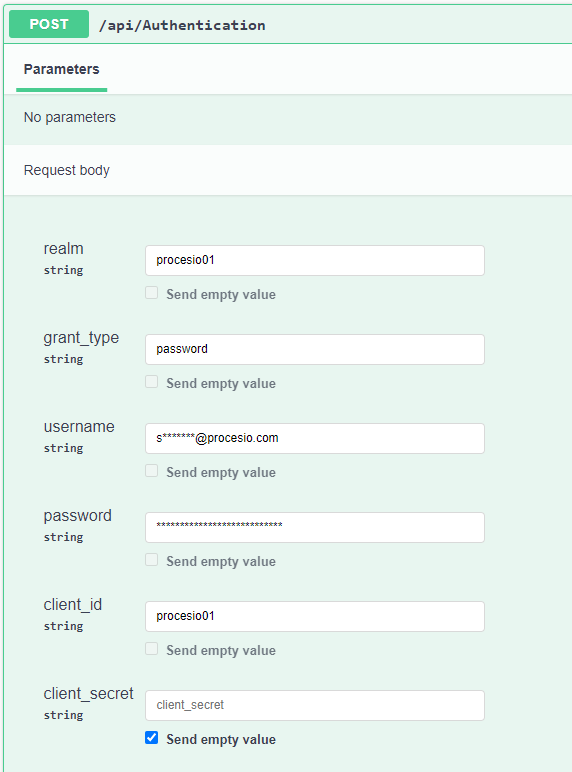
The POST /api/Authentication method requires the following parameters:
- realm: your tenant name (all users are added to "procesio01")
- grant_type: password
- username: your user name
- password: your user’s password
- client_id: procesio-ui
- client_secret: (can be left empty)
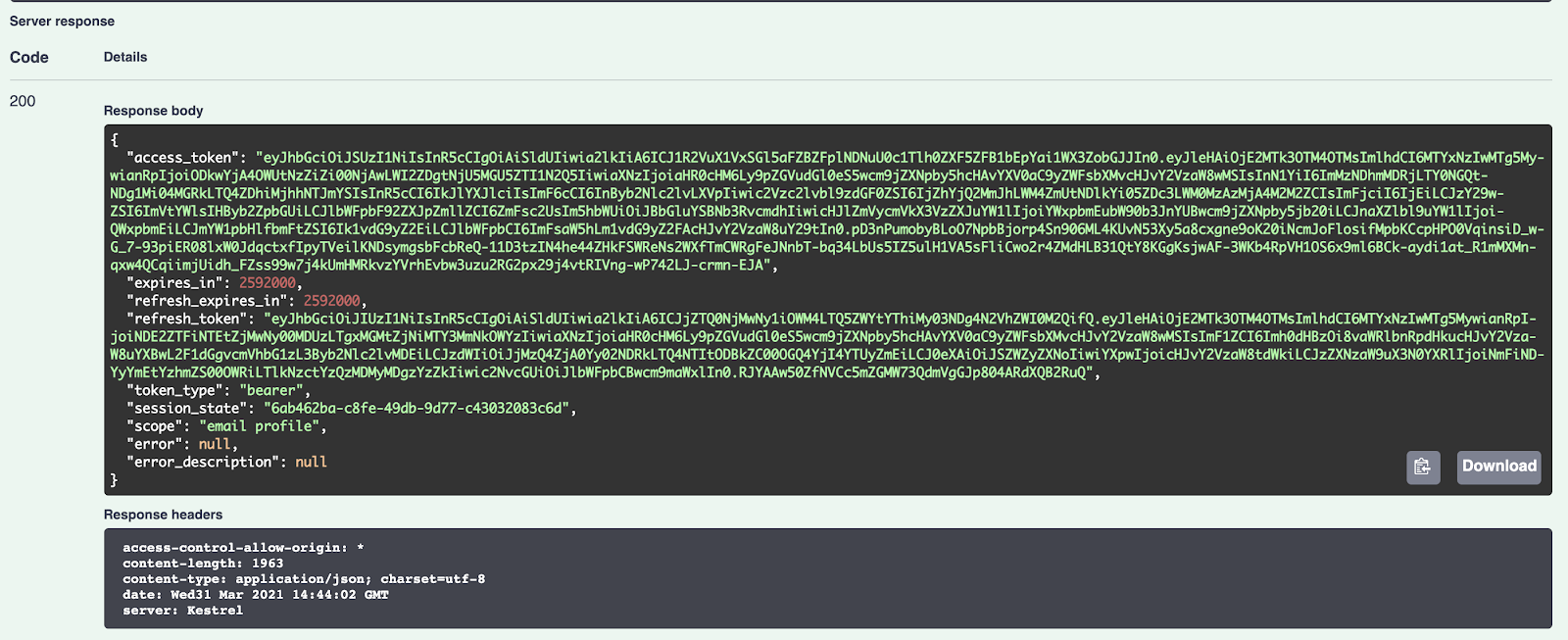
If the request is successful, you will receive an access token in the response which you will be able to use to access the Web API services.
Here’s how the request would look like testing through Swagger:
And if successful, the response in Swagger will look like this:
For a full list of methods, check Proxy API.
Web API
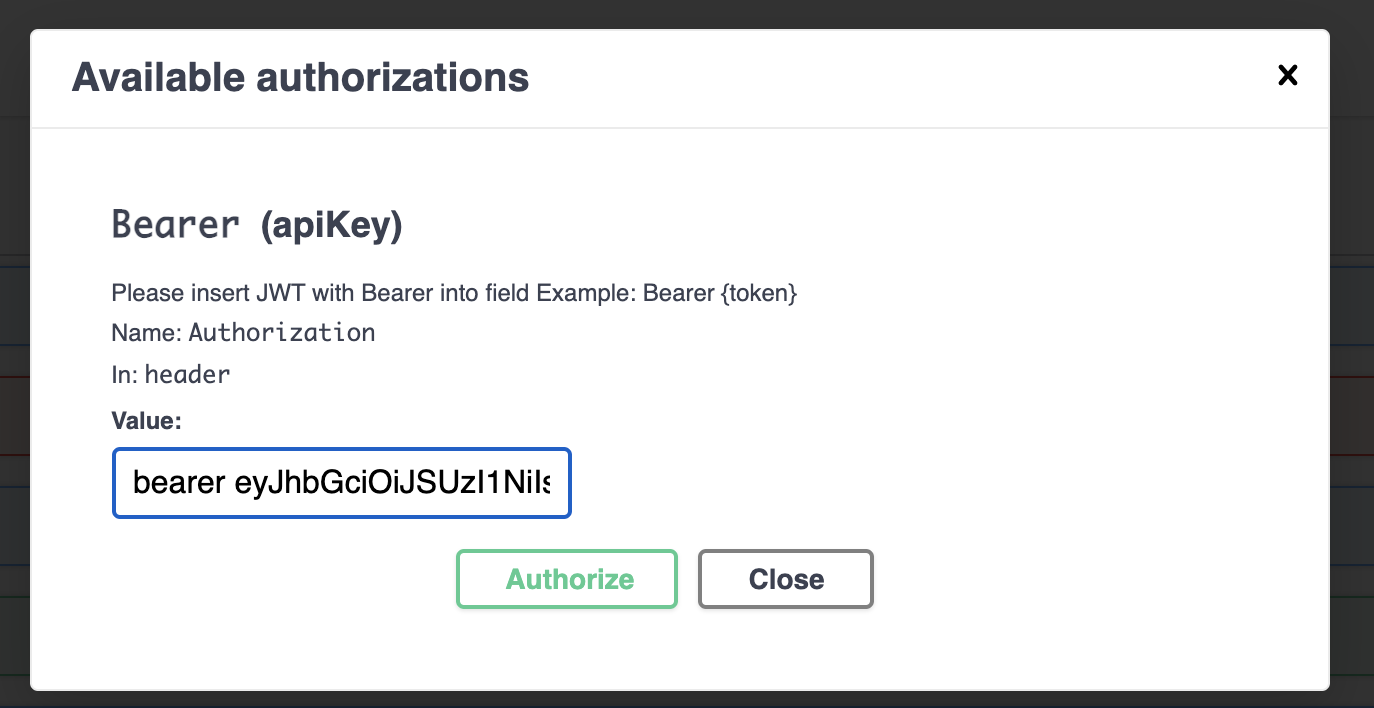
Use the Web API to interact with the PROCESIO platform. To be able to send requests to the Web API, you need to be authorized with the access token received from the Proxy API (see the previous chapter regarding the Proxy API). The Authorize button can be found in the upper right corner.
Bearer Authentication
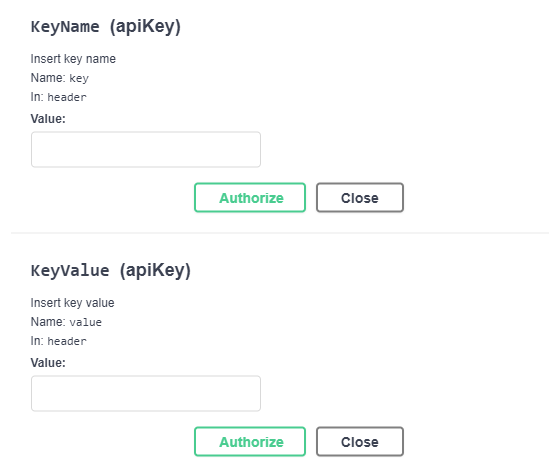
API Key Authentication
How to run a process from an external application?
Prerequisites
To run the process using a API Key we will require:
- Generate a API Key in PROCESIO.

- PROCESIO API endpoints can be found here. Additionally we also provide Swagger for our Web API endpoints which can be tested here.
- Postman for sending the request.
Postman
Configure the request:
1. Select Post Method mention the base URL and the endpoint
- Base URL: https://webApi.procesio.app
- Endpoint: /api/Projects/e6bb2d64-2f96-4e43-a84b-b25a08c0764d/run (includes the Process ID)
2. In Postman from Headers include:
| Headers | Value |
|---|---|
| key | API key name |
| value | API key value |
| workspaceId | workspace Id |
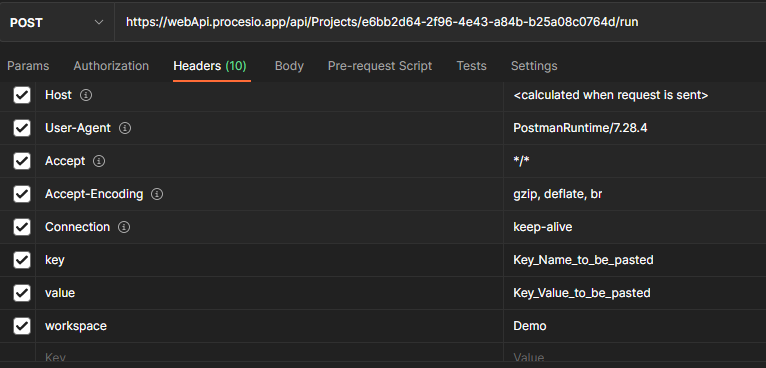
3. In Postman from Body, raw, include:
{
"payload": {},
"connectionId": null
}
In the payload add the input variables for the process as displayed in the screenshot below
4. Select JSON
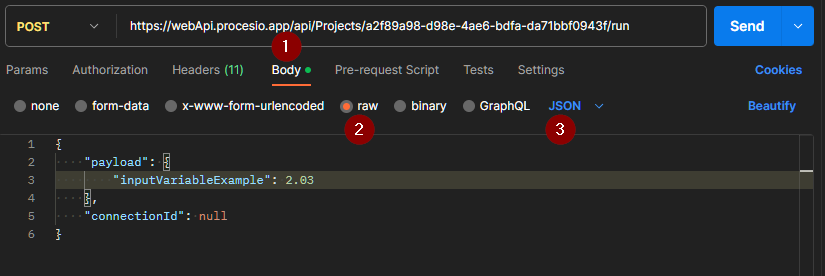
5. From Postman hit the Send button in order to trigger the process for which you configured the request.
Once authorized to the WebAPI, you have access to the following services:
| Service | Method type | Method name | Description |
|---|---|---|---|
| Actions | GET | /api/Actions/folders/{id} | Returns the full path to the process. |
| Actions | DELETE | /api/Actions/folders/{id} | Deletes the folder containing the process with all its content. |
| Actions | GET | /api/Actions/folders | Returns directory tree of the workspace. |
| Actions | POST | /api/Actions/folders | Add a new folder in your workspace. |
| Actions | PATCH | /api/Actions/folders/rename | Renames node inside your workspace. |
| Actions | GET | /api/Actions/templates/{id} | Returns information about the template. |
| Actions | DELETE | /api/Actions/templates/{id} | Deletes the specified template. |
| Actions | POST | /api/Actions/templates | Creates a new template in your workspace. |
| Actions | GET | /api/Actions/{id} | Returns information about the action. |
| Actions | DELETE | /api/Actions/{id} | Deletes the specified action. |
| Actions | GET | /api/Actions | Returns list of actions. |
| Actions | POST | /api/Actions | Add a new action in your workspace. |
| Actions | GET | /api/Actions/category/{category} | Returns information about the category. |
| Actions | POST | /api/Actions/test | Creates a new action category. |
| Actions | GET | /api/Actions/test/{id} | Returns information about the action in the specified category. |
| Actions | GET | /api/Actions/node | Returns information about the node content. |
| ApiKey | GET | /api/ApiKey | Returns the api key. |
| ApiKey | POST | /api/ApiKey | Use api key on workspace. |
| ApiKey | DELETE | /api/ApiKey | Delete api key. |
| ApiKey | DELETE | /api/ApiKey/{id} | Delete project. |
| Credentials | GET | /api/Credentials/types | Returns the credential configuration types (REST API, Email Server) with their associated fields (URL, authentication type,..). |
| Credentials | POST | /api/Credentials/types | Creates a new credential configuration type. |
| Credentials | GET | /api/Credentials/types/{id} | Returns the credential fields necessary for a given type. |
| Credentials | POST | /api/Credentials/test | Tests if a credential configuration is valid. |
| Credentials | GET | /api/Credentials | Returns a list of existing credential configurations. |
| Credentials | POST | /api/Credentials | Creates a new credential configuration. |
| Credentials | PUT | /api/Credentials | Modifies an existing credential configuration. |
| Credentials | GET | /api/Credentials/list/{templateId} | Returns information about the template. |
| Credentials | GET | /api/Credentials/{id} | Returns the credential configuration details for a configuration ID. |
| Credentials | DELETE | /api/Credentials/{id} | Deletes a credential configuration based on a configuration ID. |
| Credentials | GET | /api/Credentials/verbs/{templateId} | Returns information about the template. |
| Credentials | POST | /api/Credentials/upload/{credentialsId} | Creates a new credential. |
| Credentials | POST | /api/Credentials/upload/test | Creates a new category of credentials. |
| DataTypes | POST | /api/DataTypes | Creates a new data type. |
| DataTypes | PUT | /api/DataTypes | Modifies an existing data type. |
| DataTypes | GET | /api/DataTypes | Returns a list of available data types in the tenant. |
| DataTypes | GET | /api/DataTypes/{id} | Returns the attributes of a data type for a data type id. |
| DataTypes | DELETE | /api/DataTypes/{id} | Deletes a data type based on the data type ID. |
| DataTypes | GET | /api/DataTypes/{value} | Returns the properties of a data type based on the data type name. |
| DataTypes | GET | /api/DataTypes/primary | Returns a list of primitive data types available on the platform. |
| DataTypes | GET | /api/DataTypes/primary/count | Returns the number of primitive data types available on the platform. |
| File | POST | /api/File/upload/flow | Upload flow. |
| File | POST | /api/File/upload/testAction | Upload action. |
| File | GET | /api/File/download | Download file. |
| File | POST | /api/File/upload/schedule | Upload flow. |
| Projects | POST | /api/Projects | Create a process. |
| Projects | PUT | /api/Projects | Modify a process. |
| Projects | GET | /api/Projects | Returns a list of processes. |
| Projects | POST | /api/Projects/validate | Validates a process. |
| Projects | DELETE | /api/Projects/{id} | Deletes a process based on the ID. |
| Projects | GET | /api/Projects/{id} | Returns the process configurations based on a process ID. |
| Projects | GET | /api/Projects/{id}/instances/publish | Copies a process and creates an instance which is ready to be launched. After publishing the process, use the launch method to execute the instance using the ID returned by this method. Alternatively use the run method to execute a process. |
| Projects | GET | /api/Projects/{id}/instances | Returns a list of process instances for a given process ID. |
| Projects | GET | /api/Projects/instances/{id}/status | Returns the status of a process instance. |
| Projects | GET | /api/Projects/instances/{id}/launch | Executes a process instance by instance ID. Note that the process instance is created with the publish method. |
| Projects | POST | /api/Projects/{id}/run | Trigger a process using the process ID. |
| Projects | GET | /api/Projects/{id}/payload | Returns the payload of specified process. |
| Projects | GET | /api/Projects/{id}/used | Returns the used resources by the process. |
| Projects | PATCH | /api/Projects/{id}/toggle-activation | Change the state of the project. |
| Resources | GET | /api/Resources/used | Returns the list of existing resources on the account. |
| Resources | GET | /api/Resources/analytics/processes | Returns the analytics for all processes. |
| Resources | GET | /api/Resources/analytics/processes/{id}/details | Returns info on the process. |
| Resources | GET | /api/Resources/analytics/instances/{id}/details | Returns the analytics of specific instance. |
| Resources | GET | /api/Resources/analytics/users | Returns the user/account analytics information. |
| Schedules | GET | /api/Schedules | Returns a list of schedules. |
| Schedules | POST | /api/Schedules | Create a schedule. |
| Schedules | PUT | /api/Schedules | Modify a schedule. |
| Schedules | GET | /api/Schedules/{scheduleId} | Returns the schedule configurations based on a schedule ID. |
| Schedules | DELETE | /api/Schedules/{scheduleId} | Deletes a process based on the ID. |
| Schedules | POST | /api/Schedules/{scheduleId}/duplicate | Creates a copy of a schedule based on the ID. |
| Schedules | Patch | /api/Schedules/{scheduleId}/status | Returns the schedule status based on the ID. |
| Status | GET | /api/Status | Returns the platform status. |
| Version | GET | /gui/Version | |
| Version | POST | /gui/Version |
OnPrem Agent v1.0.3
The PROCESIO on-premises Agent or for short OnPrem Agent is a software application that can run both on Linux or Windows operating systems that…
PROCESIO SDK ~ Integrating with PROCESIO
To come to the aid of the community of developers who use PROCESIO in their applications we released a SDK that will help them get started. The…