

Call API
Sends an HTTP request (GET, POST, PUT, PATCH or DELETE) to a web API and returns the response status, body, headers or file.
Call API sends a REST/HTTP request to a web API, so a process can read, add, update or delete data in other apps and services. The response (status code, body, headers or a returned file) goes into process variables you can use in later steps.
Call API usually works with a REST API credential created in the Credentials Manager. The credential holds the base URL and the authentication of the service, so you set them up once and reuse them in every Call API step.
For example, to call the Jira REST API, create one REST API credential for Jira, then pick it in every Call API step that talks to Jira.
Add the action
In the Process Designer toolbox, pick Call API (or type Call API in the search box).
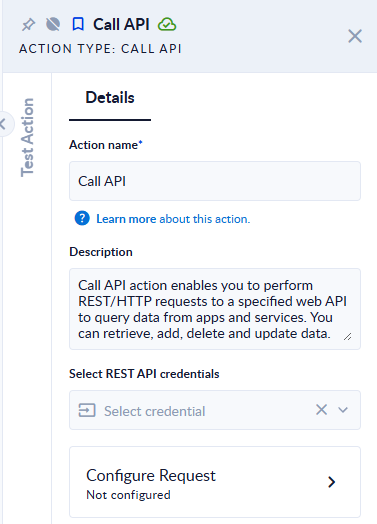
- In Select REST API credentials, pick the credential of the service you want to call. If it is not in the list yet, create it in the Credentials Manager.
- Click the Configure Request card to build the request.
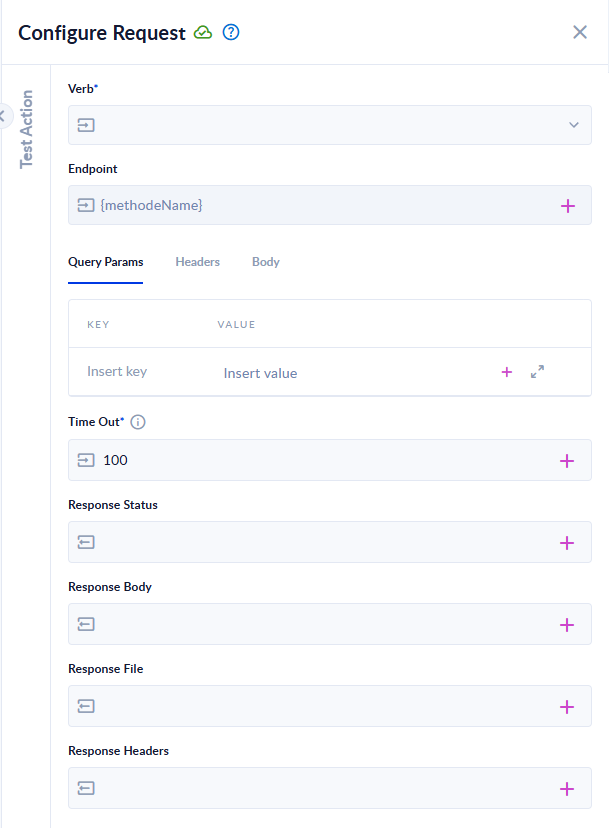
Inputs and outputs
| Field | Direction | Type | Required | What to put / what you get |
|---|---|---|---|---|
| Select REST API credentials | Input | Credential | No | The REST API credential with the base URL and authentication. |
| Verb | Input | Choice | Yes | The HTTP method: GET, POST, PUT, PATCH or DELETE. |
| Endpoint | Input | Text | No | The path to call, added to the credential's base URL, for example /rest/api/3/issue/:issueKey. Without a base URL, the full URL. |
| Query Params | Input | Name/value list | No | Query parameters, added to the URL after ?. |
| Headers | Input | Name/value list | No | Request headers. |
| Body | Input | Text, form fields or file | No | The request body: raw (JSON, text, XML, HTML or JavaScript), form-data (fields and files), x-www-form-urlencoded, or binary (one file). |
| Time Out | Input | Integer | Yes | Seconds to wait for the response: 60 to 3600, default 100. |
| Response Status | Output | Integer | No | The HTTP status code, for example 200 or 404. |
| Response Body | Output | Text or JSON | No | The response body. |
| Response File | Output | File | No | The file returned by the API, when the response is a file download. |
| Response Headers | Output | Object (JSON) | No | The response headers, as name/value pairs. |
Map only the outputs you need.
Build the request
- Endpoint: the base URL comes from the credential; add the method name and IDs. To send a path parameter, write its name after a colon, for example
/users/:userId, and give it a value. Query parameters go in Query Params, not in the URL. - Query Params and Headers: one name and value per row; a new row appears when you fill in the previous one. Values can be text, a process variable, or text with variables.
- Body: choose the body type and fill it in. Variables can be used in the body too.
To insert a process variable in Query Params, Headers or Body, press Insert (Windows) or Shift+Tab (Mac) to open the variable selector. Every variable you use is listed under Test Action › Test values, so you can test the request with sample values. To edit a long value in a full-screen editor, click the field and press Esc.

Depending on the authentication type of the credential, its key or token is added for you to the headers or the query parameters.
Example
With a credential whose base URL is https://api.example.com, Verb GET, Endpoint /customers/:id with id = 42, and Query Params fields = name,email, the step calls https://api.example.com/customers/42?fields=name,email. Response Status receives 200 and Response Body the JSON returned by the API.
Good to know
- An error status does not fail the step. A
404or500from the API is returned in Response Status and Response Body, and the process continues. Check Response Status with a Decisional when the next steps depend on success. - The step fails when there is no response at all: a timeout, an unreachable host, or an invalid URL ("Invalid URL: …").
- No base URL? If the credential has no base URL, Endpoint must be a full
http://orhttps://URL; otherwise the step fails with "Missing request URL." - Time Out below 60 is raised to 60 seconds.
- Files: when a successful response is a file, it goes into Response File instead of Response Body.
- If you add the same query parameter or header name twice, only the first one is sent.
- Response Headers keeps the first value of each header.