

Count Recent Instances
Counts the recent runs of one or more processes, or of the whole workspace, optionally only those with a given status.
Count Recent Instances returns how many recent runs (instances) exist for the processes you choose, or for the whole workspace. You can count every run or only the runs with one status, such as Running or Error. Use it, for example, to avoid starting a job while another run of it is still in progress, or to raise an alert when too many runs have failed.
Add the action
In the Process Designer toolbox, pick Count Recent Instances (or type Count Recent in the search box).
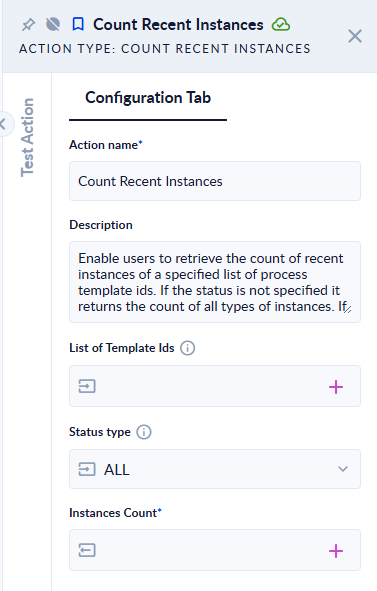
Inputs and outputs
| Field | Direction | Type | Required | What to put / what you get |
|---|---|---|---|---|
| List of Process Template Ids (List of Template Ids in newer versions) | Input | List of IDs | No | The IDs of the processes whose runs you want to count. Leave it empty to count the runs of the whole workspace. |
| Status type | Input | Choice | No | Which runs to count: ALL (default), Starting (1), Force Stopped (6), Running (30), Error (40) or Done (50). |
| Process Instances Count (Instances Count in newer versions) | Output | Integer | Yes | The number of matching runs. |
To count the runs of several processes, store their IDs in a process variable of type list of GUID and map that variable to List of Process Template Ids.
Example
Runs on our test workspace with List of Process Template Ids left empty:
| Status type | Process Instances Count |
|---|---|
| ALL | 139 |
| Done (50) | 1 |
| Error (40) | 0 |
A typical use: count the Running (30) runs of the current process, then add a Decisional that stops the run when the count is greater than 1.
Good to know
- "Recent" means the runs still in the process's instances list. Older runs that have been moved to the run history are not counted.
- ALL counts every status, including runs that are waiting to start.
- The numbers in brackets are the status codes you also see in the output of Get Recent Instances.
- Only runs of the workspace the process runs in are counted.
Related actions
- Get Recent Instances: list the runs instead of counting them.
- Get Instance Outputs, Trigger Subprocess, Call Subprocess