

Get Instance Outputs
Reads the output variables of a finished run of another process, by its run ID, into variables of the current process.
Get Instance Outputs reads the output variables of a run (instance) of another process and copies them into variables of the current process. You give it the run ID; it does not start anything. Use it together with Trigger Subprocess, which starts a run without waiting for it, to collect that run's results later.
Add the action
In the Process Designer toolbox, pick Get Instance Outputs (or type Instance Outputs in the search box).
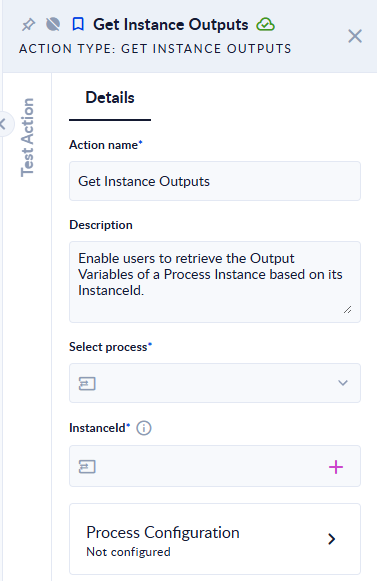
- In Select Process, pick the process the run belongs to. This tells the action which output variables exist.
- In InstanceId, put the ID of the run, usually from a variable (for example the Subprocess Instance Id of a Trigger Subprocess, or an
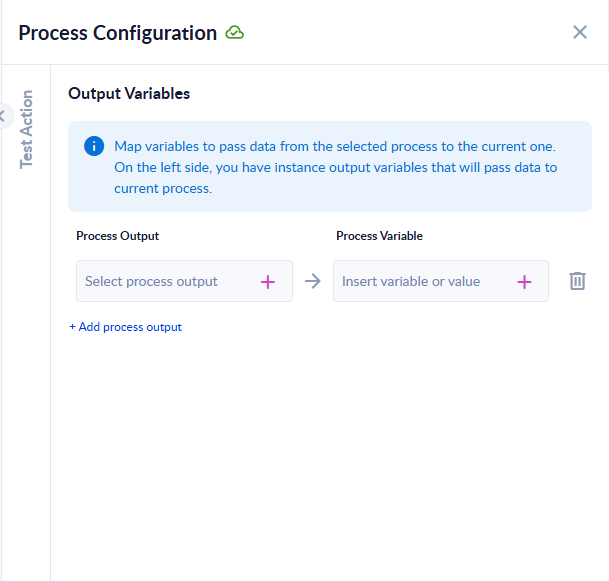
Idfrom Get Recent Instances). - Click the Process Configuration card. Under Output Variables, map each output variable of the selected process (left) to a variable of the current process (right).
Inputs and outputs
| Field | Direction | Type | Required | What to put / what you get |
|---|---|---|---|---|
| Select Process | Input | Process | Yes | The process the run belongs to. |
| InstanceId | Input | Text (ID) | Yes | The ID of the run to read. It must be a run of the current workspace. |
| Output Variables | Output | Mapping | Yes | Which output variables of that run go into which variables of the current process. |
Example
A main process starts Calculate quote with Trigger Subprocess and stores the Subprocess Instance Id in quoteRunId. Later in the main process, Get Instance Outputs with Select Process Calculate quote, InstanceId quoteRunId, maps the subprocess's output totalPrice to the main process's variable quoteTotal.
Good to know
- The run must have finished successfully. If it is still running or waiting, the step fails with "The child flow status should not be: …". Check the status first with Get Recent Instances, or wait with a Delay.
- If the run failed, the step fails with the error message of the action that failed in that run.
- If the run was stopped by a user, the step fails with "The child flow was stopped by user."
- The run must belong to your workspace. A run from another workspace is refused with "Unauthorized access of a FlowInstance from a different workspace."; an unknown ID fails with "Couldn't find the flow instance …".
- Only the output variables you map are copied. A mapping row without a source variable makes the step fail with "One of the output variables of the subprocess flow is null or empty!".