

Trigger Subprocess
Starts another published process in the background and continues the current process without waiting for it to finish.
Trigger Subprocess starts another process (the subprocess) and lets the current process carry on straight away. The subprocess runs on its own: the parent does not wait for it, and gets nothing back from it except the ID of the run it started. Use it for "fire and forget" work, such as sending notifications or starting a long job, where the rest of your process does not depend on the result.
If you need the subprocess's results before continuing, use Call Subprocess instead.
Add the action
In the Process Designer toolbox, pick Trigger Subprocess (or type Trigger Subprocess in the search box).
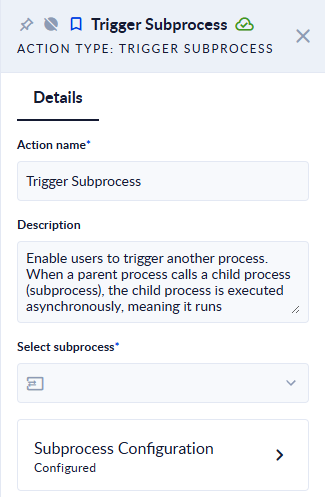
- In Select Subprocess, pick the process to start. The list shows the processes of your workspace.
- Click the Subprocess Configuration card.
- Under Input Variables, map the subprocess's input variables: on the left is the subprocess input variable, on the right the value or the variable of the current process that feeds it.
- Optionally, map Subprocess Instance Id to a variable to keep the ID of the run that was started.
Inputs and outputs
| Field | Direction | Type | Required | What to put / what you get |
|---|---|---|---|---|
| Select Subprocess | Input | Process | Yes | The process to start. |
| Input Variables | Input | Mapping | No | Values for the subprocess's input variables. Only the subprocess's input variables are listed. |
| Subprocess Instance Id | Output | Text (ID) | No | The ID of the subprocess run that was started. |
Example
An order process receives an order, saves it, and then uses Trigger Subprocess to start a Send order confirmation process, mapping the customer's email and the order number to its input variables. The order process ends right away; the confirmation process runs in parallel and can be followed in its own instances list.
To check later how that run ended, pass the Subprocess Instance Id to Get Instance Outputs or list the subprocess's runs with Get Recent Instances.
Good to know
- The parent does not wait. The Trigger Subprocess step succeeds as soon as the subprocess run has been created. If the subprocess later fails, the parent is not affected and is not told.
- There are no output variables to map. Trigger Subprocess only passes data into the subprocess. To read the subprocess's outputs, use Call Subprocess, or read them afterwards with Get Instance Outputs once the run has finished.
- The subprocess may not start immediately. It is queued like any other process run, so with your workspace's limits on parallel runs it can wait in Starting before it runs.
- The run is not linked to the parent run. The parent's run details do not show a link to the run it started (Call Subprocess does). Keep the Subprocess Instance Id if you need to find it.
- Inside a For Each, every iteration starts its own subprocess run.
- The action cannot be run with Test Action; run the whole process to try it.
Related actions
- Call Subprocess: start a subprocess and wait for its results.
- Get Instance Outputs, Get Recent Instances, Count Recent Instances
Call Subprocess
The Call subprocess action enables users to use existing processes inside another process (parent process). When a parent process calls a subprocess…
Count Recent Instances
Counts the recent runs of one or more processes, or of the whole workspace, optionally only those with a given status.