

Get Recent Instances
Lists the recent runs of a process, page by page, with each run's ID, status and last update time.
Get Recent Instances returns the recent runs (instances) of one process: the run ID, its status and when it was last updated. You can list every run or only the runs with one status. Use it to find the runs a Trigger Subprocess started, to check whether a process is still running, or to pick a finished run and read its outputs with Get Instance Outputs.
Add the action
In the Process Designer toolbox, pick Get Recent Instances (or type Recent Instances in the search box).
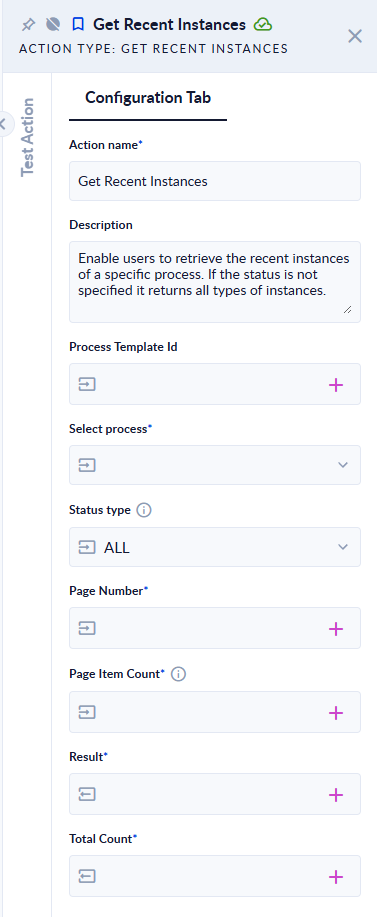
Inputs and outputs
| Field | Direction | Type | Required | What to put / what you get |
|---|---|---|---|---|
| Select Process | Input | Process | No* | The process whose runs you want, picked from the list. |
| Process Template Id | Input | ID | No* | The same, given as an ID, for example from a variable. When both are filled, Process Template Id wins. |
| Status type | Input | Choice | No | ALL (default), Starting (1), Force Stopped (6), Running (30), Error (40) or Done (50). |
| Page Number | Input | Integer | Yes | The page to return, starting at 1. |
| Page Item Count | Input | Integer | Yes | How many runs per page. 0 returns all runs in one list. |
| Result | Output | List of objects (JSON) | Yes | The runs on the requested page. |
| Total Count | Output | Integer | Yes | How many runs match in total, across all pages. |
* Fill in Select Process or Process Template Id. If both are empty, the step fails with "Both selected process and process template id are null."
Each item in Result has three fields:
| Field | Meaning |
|---|---|
Id | The run (instance) ID. Use it with Get Instance Outputs. |
Status | The status code: 1 starting, 6 force stopped, 30 running, 40 error, 50 done. Other codes can appear for runs in intermediate states. |
UpdatedOn | When the run was last updated (UTC). |
Example
Real runs on our test workspace, for a process with 65 recent runs, Page Number 1, Page Item Count 2, Status type ALL:
[
  { "Id": "cbc6742f-acf8-4048-83d2-eb7f313b67b1", "Status": 1, "UpdatedOn": "2026-10-07T07:42:13.562301Z" },
  { "Id": "5f9fd74e-e1ee-4234-a1a7-195baa98e926", "Status": 1, "UpdatedOn": "2026-10-07T07:42:13.3089907Z" }
]
Total Count 65.
For another process, Status type Done (50) and Page Item Count 0 returned its one finished run: [{"Id":"27cc73b5-…","Status":50,"UpdatedOn":"2026-10-06T14:58:38"}], Total Count 1.
A process with no recent runs returns an empty list [] and Total Count 0; the step does not fail.
Good to know
- "Recent" means the runs still in the process's instances list. Runs that have been moved to the run history are not returned.
- Starting (1) also includes runs that are queued or initializing.
- The most recently updated runs come first.
- Map Result to a list variable (for example a list of JSON objects) and loop over it with For Each.
- Only runs of the current workspace are returned.
Related actions
- Count Recent Instances: just the number of runs.
- Get Instance Outputs, Trigger Subprocess, Call Subprocess