

Read Mailbox V2
Reads emails from an IMAP or POP3 mailbox like Read Mailbox, and can sign in to the mailbox with an OAuth token from a REST API credential.
Read Mailbox V2 retrieves emails from a mailbox, exactly like Read Mailbox, with one addition: it can authenticate to the mailbox with an OAuth token taken from a REST API credential instead of the password stored in the mailbox credential. Use it for mail providers that no longer accept a plain password for IMAP or POP3.
The product describes Read Mailbox V2 as a temporary action. If your mailbox accepts the password in your POP3/IMAP credential, Read Mailbox does the same job.
Add the action
In the Process Designer toolbox, pick Read Mailbox V2 (or type Read Mailbox in the search box).
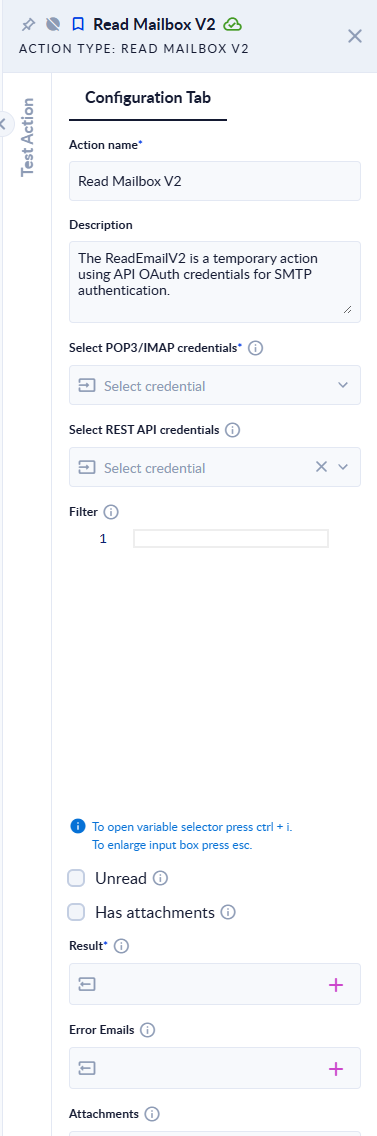
Inputs and outputs
| Field | Direction | Type | Required | What to put / what you get |
|---|---|---|---|---|
| Select POP3/IMAP credentials | Input | Credential | Yes | The SMTP Inbound credential with the mailbox server, port, protocol and account. |
| Select REST API credentials | Input | Credential | No | A REST API credential whose authorization holds the OAuth token for the mailbox. When set, the token is used to sign in to the mailbox. Leave it empty to sign in with the mailbox credential alone. |
| Filter | Input | Text | No | One filter per line, for example from: name@example.com. Empty = all emails. See Filter rules. |
| Unread | Input | Boolean (true/false) | No | Only unread emails. Has no effect on POP3. Default false. |
| Has attachments | Input | Boolean (true/false) | No | Only emails with attachments. Default false. |
| Result | Output | List of InboundEmailInformation | Yes | The emails read. |
| Error Emails | Output | List of InboundEmailInformation | No | The emails that could not be processed. |
| Attachments | Output | List of File | No | The attachments of the emails read. |
Each email in Result has the fields id, subject, to, cc, bcc, sender, body, status, size, sendDate, importanceLevel and fileIndexes. fileIndexes lists the positions, in Attachments, of that email's attachments. Create the output variable with the InboundEmailInformation data model and mark it as a list.
Example
Select POP3/IMAP credentials Support mailbox (IMAP), Select REST API credentials Support mailbox OAuth, Filter subject: Invoice, Unread checked, Has attachments checked → Result holds the unread emails whose subject contains Invoice, and Attachments their files.
Good to know
- Everything about filters, the POP3 limitation and the outputs is the same as in Read Mailbox.
- The OAuth token is read from the REST API credential as it is when the step runs. If the token has expired, the mailbox refuses the sign-in and the step fails, so keep the credential's token valid.
- If the mailbox credential is missing or invalid, the step fails with "Invalid credentials."
- The output for emails that could not be processed is called Error Emails here, and Invalid Emails in Read Mailbox.