

PROCESIO v2.0.6 (2026)
This release adds the Query Store action, the Prelude connector, Sign in with GitHub, named API keys and a high contrast mode, plus fixes for forms, processes, Data Store and sign-in.
Release Notes — New Features and Improvements
This release adds the Query Store action, the Prelude connector, Sign in with GitHub, named API keys and a high contrast mode. It also includes fixes for forms, processes, Data Store and sign-in. It was released on 21 September 2026.
New Features
Query Store action
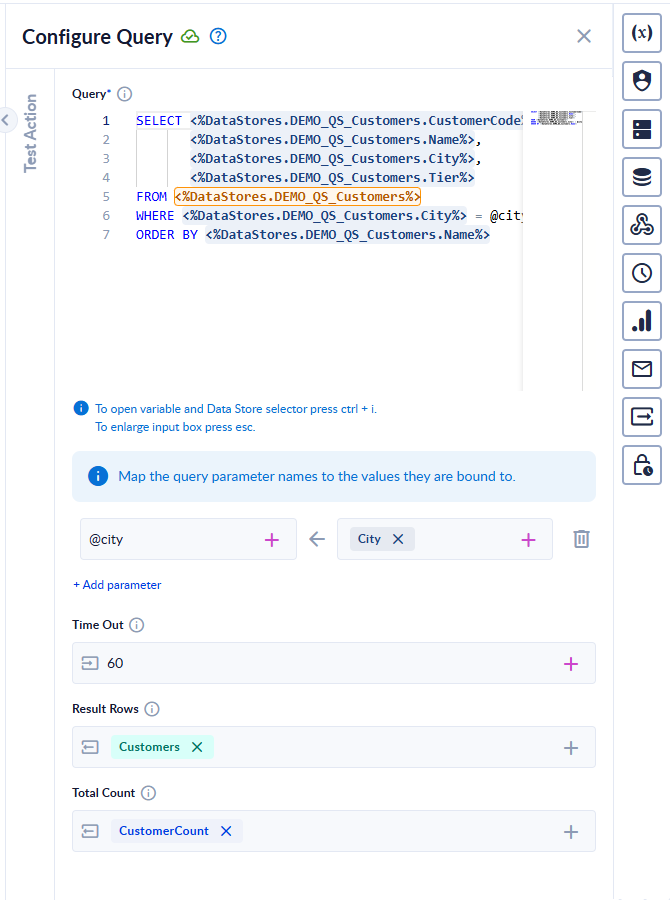
Query Store is a new platform action that runs one SQL statement against the Data Stores in your workspace, as a single step in a process. Filter, join and total your data, or insert, update and delete rows in bulk. There is no connection string or credential to set up.
- Press Ctrl + I (Cmd + I on Mac) in the query editor to insert a Data Store or one of its columns, instead of typing its name.
- Values from your process reach the query as parameters, so they can't change what the query does.
- Use Test Action to try the query on its own before you run the whole process.
- Statements that could damage your data or reach outside your workspace are refused with a clear message.
Read more in the documentation: Query Store
Prelude connector
The new Prelude connector adds phone verification to your processes, through Prelude. One action covers three operations:
- Send a code by SMS to a phone number.
- Check the code that your user typed in.
- Look up a phone number to get its country, line type and carrier.
Choose the operation from the Operation list. The action then shows only the fields that the operation needs.
To connect the action, create a credential under REST API → Prelude and enter your Prelude API key.
Sign in with GitHub
You can now sign in to PROCESIO with your GitHub account.
Named API keys
You can now give each API key a name and rename it later. The API keys list also shows when each key was created and by whom.
Read more in the documentation: API Keys
High contrast mode
Open the Appearance menu in the top bar and select Turn on high contrast to make borders and lines stronger and easier to see. To go back, select Turn off high contrast.
The same menu lets you choose the Light, Dark or System theme. System follows your computer's setting.
If your computer is set to use more contrast, PROCESIO turns on high contrast automatically, unless you have turned it off in the Appearance menu.
Bug Fixes and Improvements
Forms and Files
- Uploading several files at once: every file is now saved. Before, a file could occasionally go missing.
- Attaching the same file more than once: you can now attach the same file more than once in a form. See File Upload.
- Public forms that use a Data Store: these forms now work for users who are signed in to a different workspace, including the form's own owner.
Processes
- Decisional conditions: deleting an OR condition could leave a hidden setting behind, which made the wrong branch run. This is now fixed in both the Process Designer and the engine, so processes that were already affected run correctly again. You don't need to rebuild them. See Decisional.
- Test Action: it now runs on the first click, every time.
- Optional inputs left empty: yes/no, JSON or ID fields that you leave empty no longer make a run fail with the message Value could not be converted.
Data Store
- CSV export: values that contain line breaks are now quoted correctly, so the file opens cleanly in Excel and Google Sheets.
- Editing records on small screens: editing records on a short screen, or with the browser zoomed in, no longer collapses the records table. See Data Store.
Sign-in and Security
- Two-factor authentication: turning it on no longer signs you out and stops you from signing back in.
- Forgot password: it now works for every account, including when your email address is part of another account's address, for example
ann@example.comandjoann@example.com. - Account lockout: we improved the security of the response you get after too many failed sign-in attempts.
Look and Feel
- Dark mode: we fixed several dark mode issues, including the colors of badges.
- Keyboard focus: it is easier to see across the app.
- Schedules: screen readers now read out the name of each of the five crontab fields. See Schedules.
API
- API documentation: the Swagger documentation now matches what the API returns, with field descriptions and the correct field names. See PROCESIO API Documentation.
Summary
New features
- The Query Store action, to run SQL on your Data Stores
- The Prelude connector, for phone verification
- Sign in with GitHub
- Named API keys, with creation date and author
- High contrast mode and theme choice in the Appearance menu
Bug fixes and improvements
- Reliable uploads of several files at once, and fixes for public forms that use a Data Store
- A fix for Decisional conditions that could run the wrong branch
- Fixes for Test Action, empty optional inputs, CSV export and editing Data Store records
- Fixes for two-factor authentication and Forgot password
- Improvements to accessibility, dark mode and the API documentation
We will continue improving the PROCESIO experience based on your feedback. Share yours on our Discord channel.