

PROCESIO v2.0.7 (2026)
This release adds the Azure Storage connector, workspace renaming, a new Document Designer editor with a side-by-side Code View, links to subprocess runs, and more Query Store power, plus fixes for schedules, processes, Data Store and forms.
Release Notes — New Features and Improvements
This release adds the Azure Storage connector, workspace renaming, a new Document Designer editor with a side-by-side Code View, links from a process run to its subprocess runs, and several statements per Query Store query. It also makes two-factor authentication easier to manage, makes forms and the Process Designer load faster, and fixes issues in schedules, processes, Data Store and forms. It was released on 21 October 2026.
New Features
Azure Storage connector
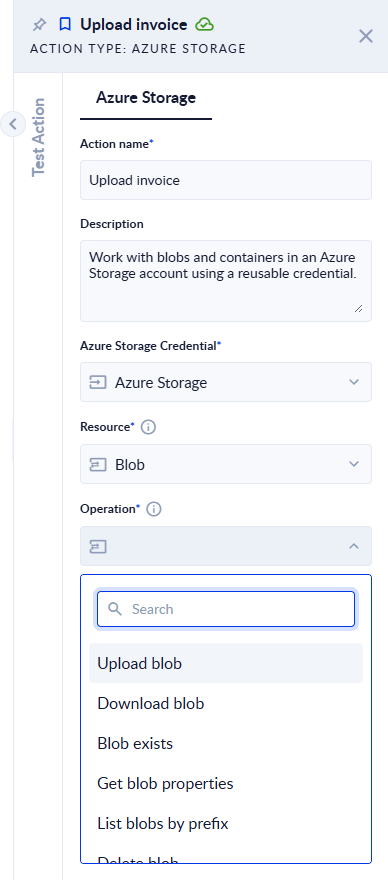
The new Azure Storage action works with blobs and containers in an Azure Storage account. One action covers 14 operations: choose Blob or Container as the Resource, then the Operation:
- Blobs: upload, download, check that a blob exists, read its properties, list by prefix, delete one, several or all under a prefix, copy and move.
- Containers: create, read, list and delete.
The action connects through a new Azure Storage Account credential that you create once in the Credential Manager. It signs in with a Shared Key (account name and access key) or a Service Principal from Microsoft Entra ID, so it also works with storage accounts that don't allow access keys.
Read more in the documentation: Azure Storage and Azure Storage Account Credential
Rename a workspace
You can now rename a workspace straight from its Dashboard: click the pencil next to the workspace name. Owners and co-owners can also rename the master workspace of an enterprise account, from its Dashboard or from the Workspace Management page. Workspace names can now be up to 100 characters long.

Read more in the documentation: Rename a workspace
Document Designer: new editor and side-by-side Code View
The Document Designer has a new editor. It shows your template as pages, at the size and orientation of the final document, and adds Zoom, Insert Page Break, and a quick + button for images, tables and lists on empty lines. Your existing templates open in the new editor as they are.
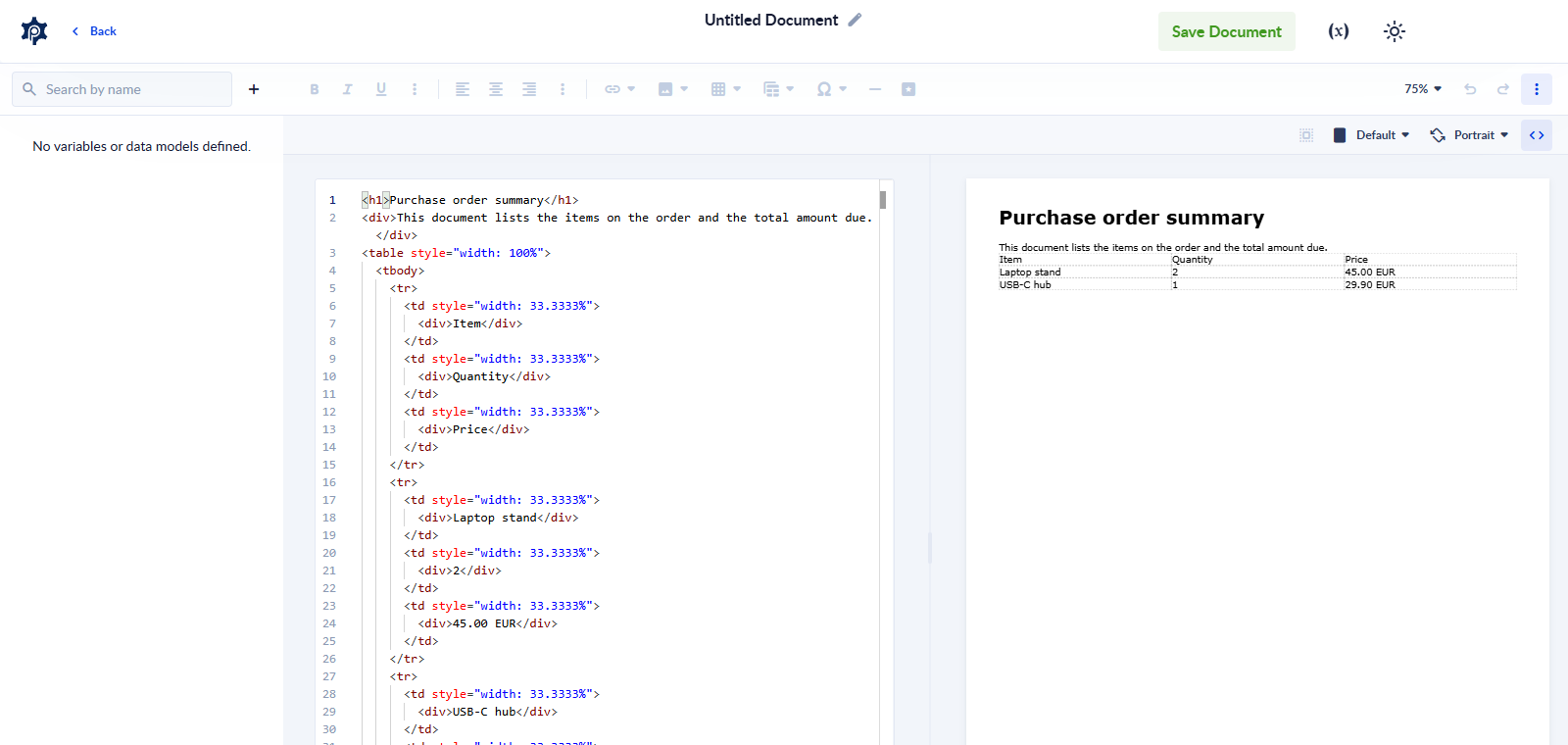
Code View now shows the HTML and a live preview side by side: edit the HTML on the left and see the page change on the right. Open it from ⋮ More Misc → Code View.
Read more in the documentation: Document template creation
Open subprocess runs from the parent run
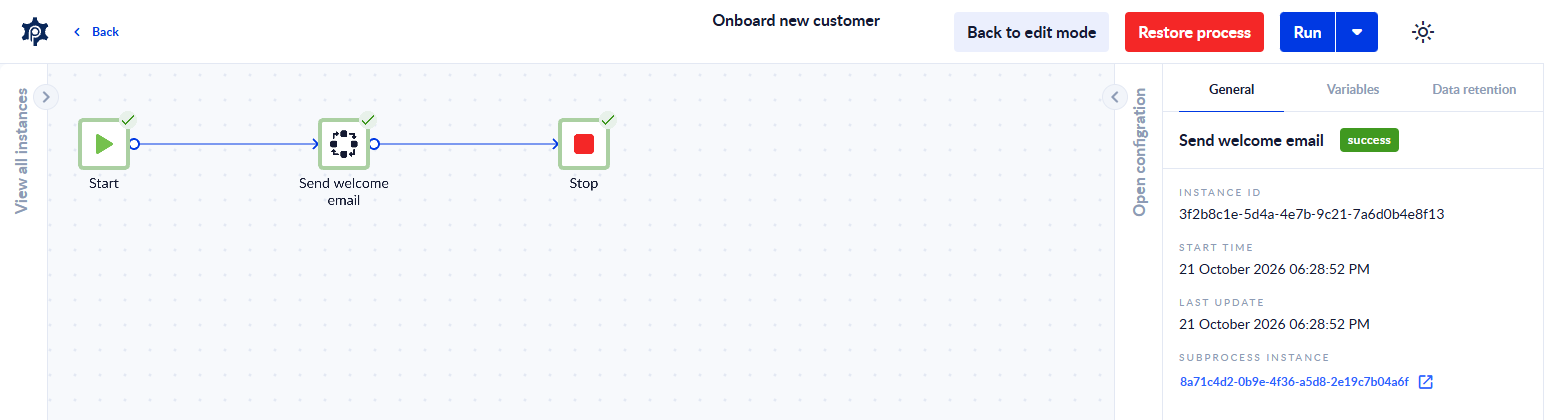
In the run details of a process, select a Call Subprocess step and open its General tab to see the run it started, under SUBPROCESS INSTANCE. Click it to open the subprocess run in a new tab, or double-click the step. When the step ran several times, for example inside a For Each, all its runs are listed in the order they started. The links stay available after the run has finished and after it moves to the history.
Read more in the documentation: Call Subprocess
Query Store: several statements and your personal workspace
A Query Store query can now hold several SQL statements, run in order. You can also use user variables (SET @name = value, SELECT … INTO @name) to pass a value from one statement to the next. Query Store now works in your personal workspace too, on your own Data Stores. In a workspace that has no Data Store yet, the message now tells you to create one first.
Read more in the documentation: Query Store
GUID Converter action
The new GUID Converter action, in the Utilitary folder, converts a Guid between its text form, hex, a decimal number and Base64. Use it, for example, to find a Data Store row by its Guid with SQL.
Read more in the documentation: GUID Converter
Form Stepper: move between steps from JavaScript
Two new functions, goToNextStep() and goToPreviousStep(), move a Stepper one step forward or back from any JavaScript event in your form, for example ProcesioForm.data.fields.stepper.goToNextStep();. Publish existing forms again to use them.
Read more in the documentation: Stepper
Bug Fixes and Improvements
Change to paged results. Asking for a page past the end of a list now always returns the last page instead of an empty one. This applies to the PROCESIO API and to the Data Store select and Get Recent Instances actions. If one of your processes pages through results until it gets an empty page, change it to stop when it has read Total Count items, otherwise it keeps receiving the last page.
Forms
- Forms and tasks left open for a long time: they now work as expected when you come back to them. Private forms open, and buttons and approvals that start a process run it. Before, the process could fail to start even though the form showed its success message.
- When a process can't start: the form now tells you, with "The process couldn't start." If an event that must finish before the form is saved fails, the form is not saved and shows "The form wasn't submitted because one of its events failed. Try again."
- Approvals on forms with a dynamic table: Approve and Reject now work when the approval runs a process before the decision is saved.
- After a network drop or sleep: a button that waits for its process, such as a task's submit button, no longer hangs. The form is saved once the process finishes.
- Custom CSS: a form's custom CSS now styles only the form. It no longer changes the Form Designer's toolbars and panels, or the page around a published form. If your CSS styled
bodyor set variables on:root, move those rules to the form's own elements. - Select submissions: a checkbox in the Submissions table header selects the submissions on the page for Export to Excel or Delete, and the delete confirmation states how many will be deleted. See Submissions.
- Faster loading: large forms, process definitions and run details are now sent compressed, including forms opened through a short link or a custom URL.
Processes
- Disabled actions on an Error path: they are now skipped, the same as on any other path. Before, a disabled action still ran when the action before it failed.
- Call Subprocess and Trigger Subprocess: when one mapped attribute of a data model is empty, only that attribute arrives empty and the rest of the data model is kept. Before, the whole data model could arrive empty. An empty attribute now arrives as null rather than as empty text or 0, so check conditions that compare it with empty text.
- Process timeout: typing a timeout outside the allowed range no longer removes the process's timeout. The field shows an error and keeps the last valid value.
- Faster Process Designer: processes open faster, especially processes that call subprocesses or generate documents.
- Run history: finished runs move to the run history faster and more reliably, also under heavy load.
Schedules
- Schedules at midnight: weekly, daily, monthly and yearly schedules that start shortly after midnight now run on the day you picked, not the day after. To fix an existing schedule, open it and save it again. See Schedules.
- Inactive processes: if you pick an inactive process, the schedule screen now tells you right away to activate it or pick another one, instead of failing when you save.
Data Store
- Numbers in the Data Store viewer: you can type decimals with a dot or a comma (
1234.5or1234,5). A number the viewer can't read is highlighted and stops the commit, instead of being saved as a different value. Very large whole numbers now show and save exactly. - Filters on JSON and list columns: Equals and Does not equal now find the right rows on Data Model, JSON, Object and list columns, in the viewer, in forms and in the Data Store action.
- Values are checked against the column type: a number with decimals written to an Integer column, a number other than 1 or 0 written to a yes/no column, or a malformed value written to a Guid column now stops with a message that names the column. Before, the value could be rounded or changed and saved. Integer columns accept their full range of large whole numbers.
- Yes/no columns: they now accept the same values when you add, update and filter rows through the API or from a form:
trueandfalsein any letter case, and1and0.
Documents
- Generate Document and HTML to PDF keep your CSS as written: outline shadows, nested numbering such as 1.2.3, and background images set with the
backgroundshorthand are no longer changed or dropped. A double quote in your text prints as a double quote. Generated documents also use a fixed copy of their stylesheet, so their look doesn't change when an outside library is updated.
Integrations and Custom Actions
- Azure Blob Storage: Copy Object and Move Object now keep the file's content type and metadata. If a copy fails, Move Object keeps the source file.
- Custom actions: packages built for more than one .NET version can now be uploaded, and PROCESIO runs the newest build it supports. Custom actions that take a credential as an input can be uploaded too. Existing custom actions keep working without a rebuild.
Sign-in and Security
- Two-factor authentication status: the user menu shows 2FA enabled when 2FA is already on for your account, instead of offering to enable it again.
- Workspaces that require 2FA: if you open one without 2FA set up, a single message now explains it and offers Enable 2FA or Switch to personal workspace, instead of a series of error messages. Requiring 2FA in a master workspace applies to every workspace inside it, including workspaces created later, so members without 2FA are asked to set it up in all of them. See Two-factor authentication.
Platform
PROCESIO's services now run on .NET 10, with updated libraries for archive, email, SFTP, SQL Server and document actions. Existing processes and custom actions keep working. A few things behave differently:
- SFTP: servers that accept only old key types, such as DSA, can no longer be reached. Use an RSA, ECDSA or Ed25519 key.
- Call API certificates: a certificate credential in
.p7bformat no longer loads. Convert the certificate to another format before you upload it. - File types: files saved by file actions get the standard content type,
text/csvfor.csvandtext/javascriptfor.js. - API version header: API requests that send an
x-versionheader must send1.19. Requests without the header work as before.
Summary
New features
- The Azure Storage connector, with Shared Key or Service Principal sign-in
- Rename a workspace, including the master workspace
- A new Document Designer editor with a side-by-side Code View
- Links from a process run to the subprocess runs it started
- Query Store with several statements, user variables and personal workspaces
- The GUID Converter action
- Stepper navigation from JavaScript
Bug fixes and improvements
- Paged results return the last page instead of an empty one: check processes that loop until an empty page
- Forms work after being left open, tell you when a process can't start, and load faster
- Fixes for disabled actions on Error paths, subprocess data models and the process timeout
- Schedules near midnight run on the right day
- Data Store checks values against the column type and filters JSON and list columns correctly
- Generated documents keep your CSS as written
- Clearer two-factor authentication status and messages
- PROCESIO now runs on .NET 10
We will continue improving the PROCESIO experience based on your feedback. Share yours on our Discord channel.
Announcements
Release announcements for PROCESIO — new features, enhancements, and fixes, newest first.
PROCESIO v2.0.6 (2026)
This release adds the Query Store action, the Prelude connector, Sign in with GitHub, named API keys and a high contrast mode, plus fixes for forms, processes, Data Store and sign-in.