

List Keys
Lists the keys (names) of the objects in an Amazon S3 bucket, optionally only under a prefix.
List Keys returns the keys of the objects in an Amazon S3 bucket as a list of text. Give a prefix to list only one folder. Use the list in a For Each, or pass it to Delete by Keys.
Before you start
The AWS S3 actions don't use a stored credential. Each action has the same four connection fields:
| Field | Type | Required | What to put |
|---|---|---|---|
| Access Key | Text | Yes | The access key ID of an AWS IAM user, for example AKIA…. |
| Secret Key | Text | Yes | The secret access key that belongs to that access key. |
| Region | Text | Yes | The AWS region of the bucket, as its code, for example eu-central-1. |
| Bucket | Text | Yes | The bucket name, for example my-company-invoices. |
The IAM user needs S3 permissions on the bucket for the operation you run. The values you type are visible to everyone who can edit the process, so prefer an IAM user limited to the buckets the process needs.
Add the action
In the Process Designer toolbox, open AWS S3 and pick List Keys (or type List Keys in the search box).
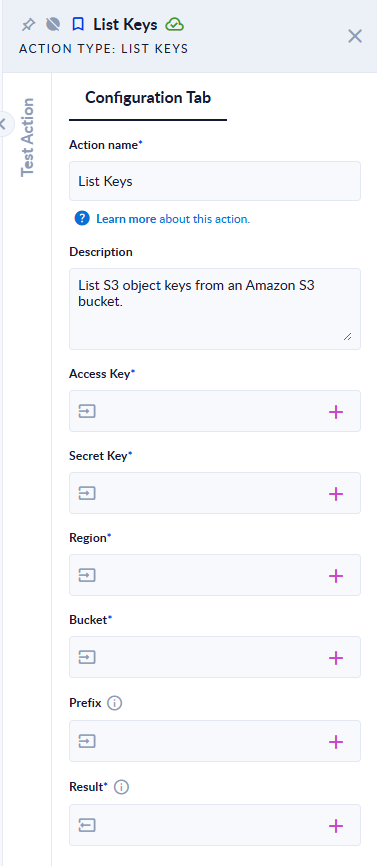
Inputs and outputs
| Field | Direction | Type | Required | What to put / what you get |
|---|---|---|---|---|
| Access Key, Secret Key, Region, Bucket | Input | Text | Yes | The connection fields described above. |
| Prefix | Input | Text | No | Only keys that start with this text are listed, for example invoices/2026/. Leave empty to list the whole bucket. |
| Result | Output | List of Text | Yes | The full keys found, for example ["invoices/2026/inv-001.pdf", "invoices/2026/inv-002.pdf"]. |
Example
Prefix invoices/2026/ → Result lists every key under invoices/2026/, including keys in deeper "subfolders" such as invoices/2026/q1/inv-003.pdf.
Good to know
- The prefix matches the start of the key:
invoicesalso matchesinvoices-old/…. End it with/to list one folder only. - Keys are listed in alphabetical order, and subfolders are not separated: you get every key under the prefix.
- One run returns at most 1,000 keys (one S3 listing page). Use a more specific prefix on large buckets.
- If a connection field is empty, the step fails with "Invalid connection details."
- Common errors from S3: "Access forbidden! Ensure the connection details are valid." (wrong keys or missing permission), "Unable to connect! Ensure the provided region matches the bucket one." (wrong Region), and "Unrecognized Amazon Region: …" (a region code that doesn't exist).