

Builder
Builds an XML document by adding tags, values and attributes to a template, following a list of specs.
The Builder action in the XML folder starts from a template XML and adds new tags to it, following a list of specs. Each spec says where (an XPath), which tag, what value and, optionally, which attributes. Unlike XML Processor, Builder always adds a tag, even when one with the same name exists, so it suits repeated elements such as invoice lines.
Add the action
In the Process Designer toolbox, open XML and pick Builder (or type Builder in the search box).
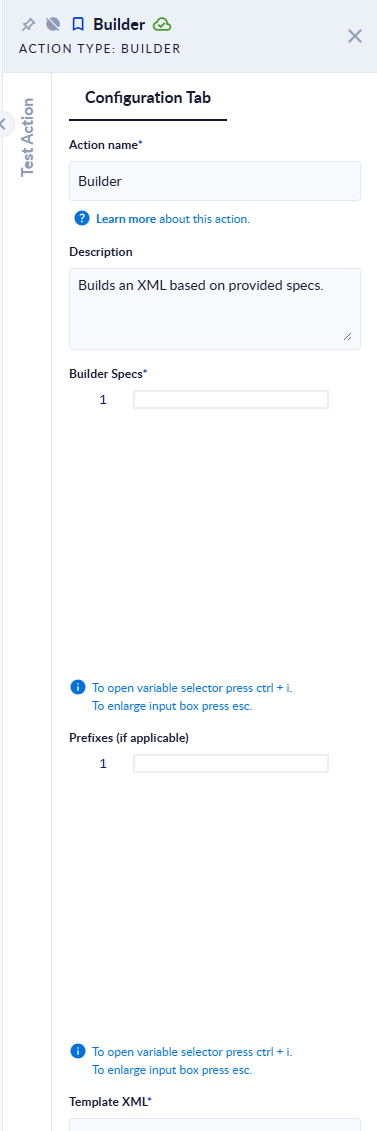
Inputs and outputs
| Field | Direction | Type | Required | What to put / what you get |
|---|---|---|---|---|
| Builder Specs | Input | Text (JSON) | Yes | The list of specs, as a JSON array (see below). |
| Prefixes (if applicable) | Input | Text (JSON) | No | Namespace prefixes as a JSON object, for example {"cbc": "urn:…:CommonBasicComponents-2"}. Leave empty when you use none. |
| Template XML | Input | Text | Yes | The XML to start from, for example <Invoice></Invoice>. |
| Output XML | Output | Text | Yes | The resulting XML. |
The specs
| Property | What it does |
|---|---|
xpath | Required. Selects the node(s) to add the tag under. |
xmlTag | The tag to add. Write prefix:Tag to use a prefix from Prefixes (if applicable). |
newValue | The tag's value. |
attribute | Optional. A list of attributes, each written as name=value, for example ["qty=2", "unit=pcs"]. |
Example
Template XML <Invoice><Line>Existing</Line></Invoice>, Builder Specs:
[
  { "xpath": "/Invoice", "xmlTag": "Line", "newValue": "A" },
  { "xpath": "/Invoice", "xmlTag": "Line", "newValue": "B", "attribute": ["qty=2", "unit=pcs"] }
]
Output XML:
<Invoice><Line>Existing</Line><Line>A</Line><Line qty="2" unit="pcs">B</Line></Invoice>With a namespace: Template XML <Invoice></Invoice>, Prefixes (if applicable) {"cbc": "urn:oasis:names:specification:ubl:schema:xsd:CommonBasicComponents-2"}, Builder Specs [{"xpath":"/Invoice","xmlTag":"cbc:ID","newValue":"INV-1"}] → Output XML:
<Invoice><cbc:ID xmlns:cbc="urn:oasis:names:specification:ubl:schema:xsd:CommonBasicComponents-2">INV-1</cbc:ID></Invoice>Good to know
- Each new tag is added as the last child of every node the
xpathselects. Existing tags are never changed. - Specs run in order, so a later spec can add under a tag an earlier one created.
- If a spec's
xpathmatches nothing, Output XML is empty (the step does not fail). If more specs follow, the next one fails withTemplate xml cannot be null or empty. - XML that is not well-formed, or an invalid XPath, fails the step with
Input XML or XPath was not valid.