

XML Is Valid
Checks that an XML text is well-formed and, optionally, valid against an XSD schema. The step fails when it is not.
The Is Valid action in the XML folder checks an XML text. Without a schema it checks that the XML is well-formed. With an XSD schema (as a file or a URL) it also checks the XML against that schema. It has no output: the step succeeds when the XML is valid and fails when it is not, with a message that explains why.
Add the action
In the Process Designer toolbox, open XML and pick Is Valid. The JSON, HTML and PDF folders each have an action with the same name, so check the folder.
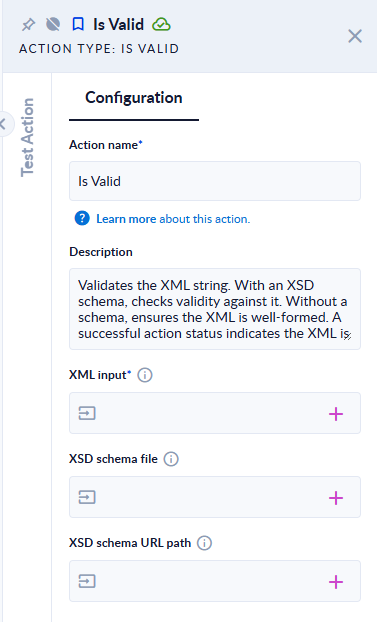
Inputs and outputs
| Field | Direction | Type | Required | What to put / what you get |
|---|---|---|---|---|
| XML input | Input | Text | Yes | The XML text to check. |
| XSD schema file | Input | File | No | An .xsd schema file to validate against. |
| XSD schema URL path | Input | Text | No | The URL of an XSD schema. Used only when no XSD schema file is given. |
The action has no output. The result is the step status.
What happens
| XML input | Step result |
|---|---|
<bookstore><book><title>Harry Potter</title></book></bookstore> (no schema) | Succeeds |
<a><b></a> | Fails: XML is not in the correct format. Details: The 'b' start tag on line 1 position 5 does not match the end tag of 'a'. Line 1, position 9. |
just text | Fails: XML is not in the correct format. Details: Data at the root level is invalid. Line 1, position 1. |
| empty | Fails: XML input is null |
With a schema, XML that breaks it fails with XML is not valid based on provided XSD schema. Validation Errors: followed by each problem the validator found.
Good to know
- The schema file name must end in
.xsd; any other extension fails the step. - When you give both a schema file and a URL, the file is used and the URL is ignored.
- The URL must be reachable from the PROCESIO servers.
- Connect the action's error port if invalid XML should not stop the process.