

CURL
Runs a curl command and returns the HTTP status, the response body and any curl error.
The CURL action runs a curl command, the same one you would type in a terminal, and gives you the HTTP status code and the response body. Use it when you already have a working curl command (for example copied from an API's documentation) and want to run it from a process without rebuilding it in Call API.
Add the action
In the Process Designer toolbox, open Scripting and pick CURL (or type CURL in the search box).
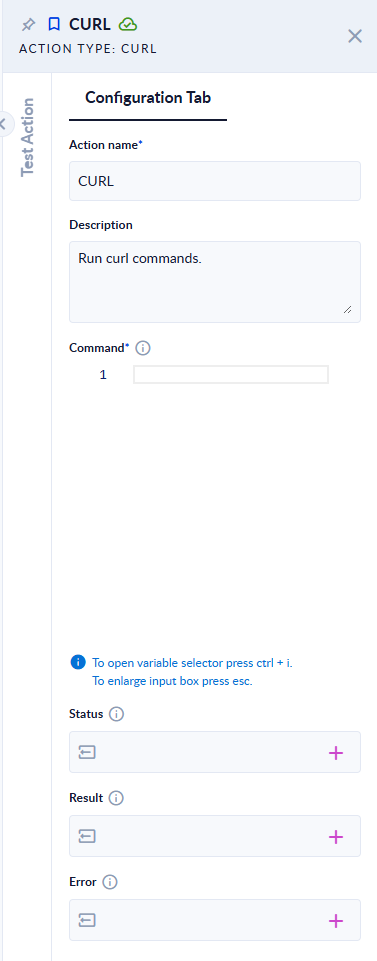
Inputs and outputs
| Field | Direction | Type | Required | What to put / what you get |
|---|---|---|---|---|
| Command | Input | Text | Yes | The full curl command. It must start with curl. You can insert process variables into it, for example in the URL, a header or the body. |
| Status | Output | Integer | No | The HTTP status code of the response, for example 200 or 404. Empty when curl could not get a response at all. |
| Result | Output | Any | No | The response body. A JSON response comes back as an object you can read with other JSON actions; any other response comes back as text. |
| Error | Output | Text | No | The curl error message when the command could not run or the server could not be reached. Empty when the call worked. |
Examples
| Command | Status | Result | Error |
|---|---|---|---|
curl https://httpbin.org/get?name=procesio | 200 | JSON object, with "args": {"name": "procesio"} | empty |
curl -X POST https://httpbin.org/post -H "Content-Type: application/json" -d '{"a":1}' | 200 | JSON object, with "json": {"a": 1} | empty |
curl -H "Authorization: Bearer abc123" https://httpbin.org/headers | 200 | JSON object that echoes the Authorization header | empty |
curl https://httpbin.org/robots.txt | 200 | Text: User-agent: * … | empty |
curl https://httpbin.org/status/404 | 404 | empty | empty |
curl https://no-such-host.invalid/ | empty | empty | curl: (6) Could not resolve host: no-such-host.invalid |
ls -la | empty | empty | The curl command doesn't start with curl, please make sure it starts with curl! |
| (empty) | empty | empty | Invalid curl command, command is null or empty! |
Good to know
- An HTTP error does not stop the process. A
404or500answer, an unknown host or a command that is not a curl command all finish the step normally and fill Status or Error. Add a Decisional after the action to check Status (for exampleStatus = 200) or to check that Error is empty before you continue. - Only
curlcommands are accepted: the command must start withcurl. - Use the usual curl options to set the method (
-X), headers (-H) and body (-d). Put a JSON body between single quotes, as in the POST example above. - If a header or body contains a secret (an API key, a token), keep it in a process variable or use Call API with a credential, so the secret does not sit in plain text in the process.
- The step fails, and the process stops, only when the curl service itself is not available. The message is then
Curl service is currently unavailable.orCurl service is down or unreachable !.
Related actions
- Call API: build an HTTP request field by field, with a saved REST API credential.
- Extract Objects: read values from the JSON in Result.
- Node, Python, Ruby