

Base64
Base64 To String
Decodes a Base64 string back into readable text.
Base64 To String decodes a Base64 string and gives you the original text. Use it when an API or a webhook sends you text that was Base64-encoded.
If the Base64 string holds a whole file (a PDF, an image, a spreadsheet), use Base64 To File instead: it rebuilds the file so you can save, send or attach it.
Add the action
In the Process Designer toolbox, open Base64 and pick Base64 To String (or type Base64 To String in the search box).
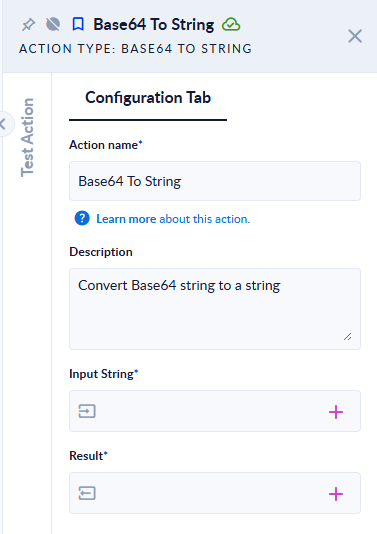
Inputs and outputs
| Field | Direction | Type | Required | What to put / what you get |
|---|---|---|---|---|
| Input String | Input | Text | Yes | The Base64 string to decode. |
| Result | Output | Text | Yes | The decoded text. |
Example
| Input String | Result |
|---|---|
SGVsbG8sIFBST0NFU0lPIQ== | Hello, PROCESIO! |
SGVsbG8sIFBST0NFU0lPISDEg8OuyJk= | Hello, PROCESIO! ăîș |
not base64! | The step fails: "The input is not a valid Base-64 string…" |
Good to know
- The decoded bytes are read as UTF-8 text. Text that was encoded in another character set (for example Windows-1252) can show wrong characters.
- The input must be standard Base64. Spaces in the middle, URL-safe characters (
-and_) or wrong padding make the step fail with the message above. - Decoding binary content (an image, a PDF) with this action gives unreadable text. Use Base64 To File for files.