

Base64
String To Base64
Encodes a text as a Base64 string.
String To Base64 turns a text into its Base64 form. Use it when an API, a header or a file format expects Base64, for example a Basic authentication header or a body field that carries encoded text.
Add the action
In the Process Designer toolbox, open Base64 and pick String To Base64 (or type String To Base64 in the search box).
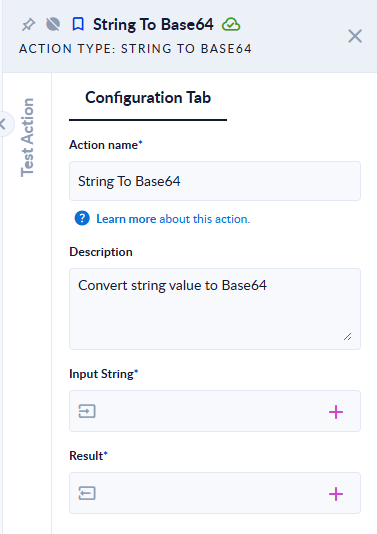
Inputs and outputs
| Field | Direction | Type | Required | What to put / what you get |
|---|---|---|---|---|
| Input String | Input | Text | Yes | The text to encode. |
| Result | Output | Text | Yes | The Base64 encoding of the text. |
Example
| Input String | Result |
|---|---|
Hello, PROCESIO! | SGVsbG8sIFBST0NFU0lPIQ== |
Hello, PROCESIO! ăîș | SGVsbG8sIFBST0NFU0lPISDEg8OuyJk= |
| (empty text) | (empty text) |
Good to know
- The text is encoded as UTF-8 before it is converted, so letters with diacritics and other non-English characters are kept. Decode the result with Base64 To String to get the same text back.
- The result is standard Base64 (with
+,/and=padding), not the URL-safe variant. If you need URL-safe Base64, replace the characters with a string action afterwards. - If the input is not set at all, the step fails with "Input Error: Please provide a non-empty string !".
- To encode the content of a file instead of a text, use File To Base64.