

HTML Manipulation
Sets an attribute on an HTML element, or adds a new child element to it, using XPath to find the element.
The HTML Manipulation action changes an HTML text. You point at an element with an XPath expression, then either set one of its attributes (for example a link's href) or add a new element inside it (for example a new list item). The result is the whole HTML, changed.
Add the action
In the Process Designer toolbox, open HTML and pick HTML Manipulation (or type HTML Manipulation in the search box).
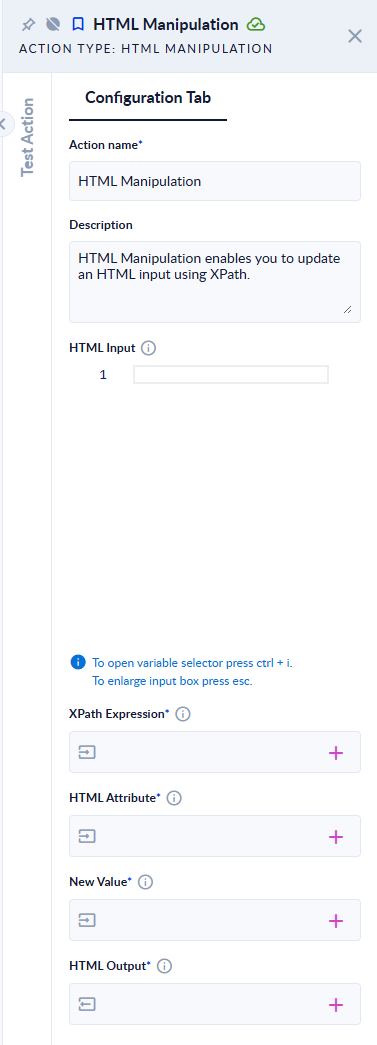
Inputs and outputs
| Field | Direction | Type | Required | What to put / what you get |
|---|---|---|---|---|
| HTML Input | Input | Text | No | The HTML to change. |
| XPath Expression | Input | Text | Yes | Selects the element to change, or the parent element to add a new element to, for example //a or //ul[@id="menu"]. |
| HTML Attribute | Input | Text | Yes | The attribute to set, for example href. Leave it empty to add a new element instead. |
| New Value | Input | Text | Yes | The attribute's value, or, when HTML Attribute is empty, the full HTML of the element to add. |
| HTML Output | Output | Text | Yes | The changed HTML. |
Example
| HTML Input | XPath Expression | HTML Attribute | New Value | HTML Output |
|---|---|---|---|---|
<div><a href="old.html">Link</a></div> | //a | href | https://example.com | <div><a href="https://example.com">Link</a></div> |
<ul id="menu"><li>Home</li></ul> | //ul[@id="menu"] | (empty) | <li>Contact</li> | <ul id="menu"><li>Home</li><li>Contact</li></ul> |
<div></div> | //table | class | x | The step fails: The provided XPath expression did not match any nodes in the HTML document. |
Good to know
- Only the first element the XPath matches is changed. To change a specific one, make the XPath precise (
//a[@id="home"],(//a)[2]). - Setting an attribute that does not exist yet adds it; setting one that exists replaces its value.
- A new element is added as the last child of the selected element.
- HTML Attribute is marked as required in the panel, but it must be left empty to add an element.
- An empty HTML Input fails the step with
HTML input is null.
Related actions
- HTML Is Valid, Sanitizer, HTML To PDF
- Update, the same idea for XML