

Word Mail Merge
Fills the mail merge fields of a Word (.docx) document with your values, and can save the result as PDF.
Word Mail Merge takes a Word document that contains mail merge fields (for example «FirstName») and replaces each field with a value from your process. Use it to produce letters, contracts or certificates from a template that was designed in Word.
Add the action
In the Process Designer toolbox, open Documents and pick Word Mail Merge (or type Word Mail Merge in the search box).
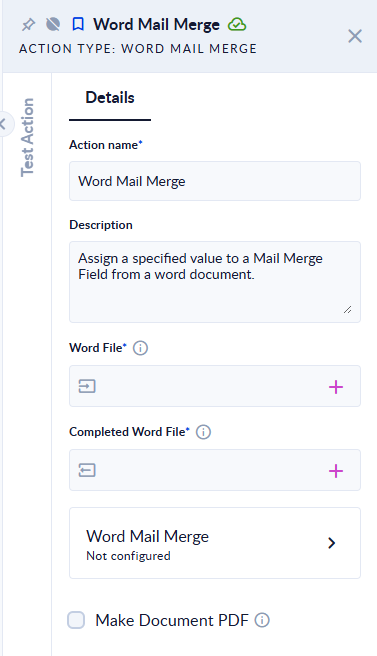
Inputs and outputs
| Field | Direction | Type | Required | What to put / what you get |
|---|---|---|---|---|
| Word File | Input | File | Yes | The template, a .docx file with mail merge fields. |
| Word Mail Parameters (in the Word Mail Merge card) | Input | Pairs of field name and value | Yes | One row per field: on the left the field name exactly as in the document, on the right a fixed value or a process variable. |
| Make Document PDF | Input | Boolean (true/false) | No | Tick it to get a PDF instead of a Word file. |
| Completed Word File | Output | File | Yes | The filled document. It keeps the template's name, with .pdf instead of .docx when Make Document PDF is ticked. |
Prepare the template
In Word, open Mailings › Insert Merge Field (or Insert › Quick Parts › Field › MergeField) and give each field a name without spaces, for example FirstName or Order_Id. The fields can be in the body, in headers and in footers.
Example
Template letter.docx: Dear «FirstName», your order «OrderId» ships on «ShipDate». «Unmapped»|«firstname»
Word Mail Parameters FirstName → Ana, OrderId → 1042, ShipDate → 12 Nov 2026 → Completed Word File letter.docx:
Dear Ana, your order 1042 ships on 12 Nov 2026. |
| Case | Result |
|---|---|
A field that has no row («Unmapped») | Replaced with nothing |
A row whose name differs only in case (firstname vs FirstName) | Not matched, the field is replaced with nothing |
| Two rows with the same field name | The step fails: "Duplicate destination field names found: …" |
A template named hello.txt | The step fails: "Input error: File extension should be '.docx', found => .txt" |
| A real Word template with Make Document PDF ticked | Completed Word File is a PDF, mm.docx becomes mm.pdf |
Good to know
- Field names are case-sensitive and must match exactly. A field that gets no value is removed from the document, so a typo shows up as an empty spot, not as an error.
- Every merge field is replaced by plain text. The value does not keep the formatting switches of the field (number or date formats), so format dates and numbers in your process before the merge.
- Values are inserted as text: line breaks, HTML and images in a value are not rendered.
- Only
.docxfiles are supported. Save older.doctemplates as.docxfirst. - A file that is not a valid Word document fails with "The input file appears to be corrupted or is not a valid .docx file."
- To build documents from a template designed in PROCESIO instead of Word, use Generate Document.