

Check Boolean
Stops the process with an error unless a true/false value is the one you expect.
Check Boolean compares a true/false value with the value you expect. If they match, the process simply continues. If they do not, the step fails with an error. Use it as a guard: for example, stop the process when a validation returned false, or when an approval flag is not true.
Add the action
In the Process Designer toolbox, open Utilitary and pick Check Boolean (or type Check Boolean in the search box).
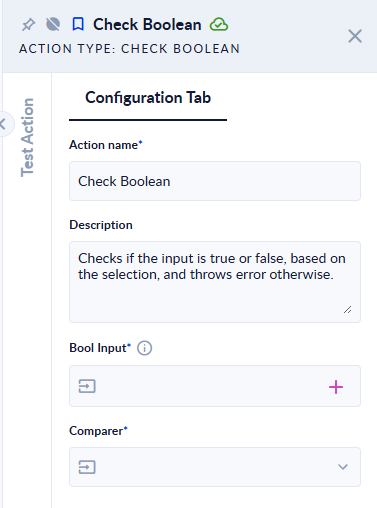
Inputs and outputs
| Field | Direction | Type | Required | What to put / what you get |
|---|---|---|---|---|
| Bool Input | Input | Boolean (true/false) | Yes | The value to check, usually a Boolean variable. |
| Comparer | Input | Option list | Yes | True or False: the value you expect. |
The action has no outputs. Its result is that the step either succeeds or fails.
Example
| Bool Input | Comparer | Result |
|---|---|---|
true | True | step succeeds |
false | False | step succeeds |
true | False | step fails: Input does not match the selected comparator. |
| (empty) | True | step fails: Input can't be null. |
yes or 1 | True | step fails: the value is not a Boolean |
Good to know
- Only
trueandfalseare accepted. Text such asyesor a number such as1is not converted. - To branch the process on a true/false value instead of stopping it, use a Decisional action.