

Generate Integer
Generates a random whole number between the limits you set.
Generate Integer picks a random whole number between a lower and an upper limit. Use it for test data, to pick a random item from a list (by index), to spread work across queues, or to generate a numeric code.
Add the action
In the Process Designer toolbox, open Utilitary and pick Generate Integer (or type Generate Integer in the search box).
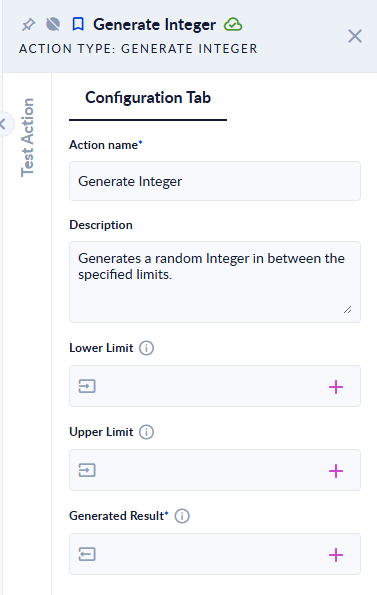
Inputs and outputs
| Field | Direction | Type | Required | What to put / what you get |
|---|---|---|---|---|
| Lower Limit | Input | Integer | No | The smallest number you can get. Empty means the smallest possible integer, -2147483648. |
| Upper Limit | Input | Integer | No | The limit you stay below. This number itself is never returned. Empty means 2147483647. |
| Generated Result | Output | Integer | Yes | The random number. |
Example
| Lower Limit | Upper Limit | Generated Result (one run) |
|---|---|---|
1 | 10 | 2 (any number from 1 to 9) |
-10 | -5 | -9 (any number from -10 to -6) |
1 | 2 | 1 (always 1) |
5 | 5 | step fails: Lower Limit should be less than Upper Limit. |
10 | 1 | step fails: Lower Limit should be less than Upper Limit. |
| (empty) | (empty) | -838819880 |
Upper Limit is not included. For a dice roll from 1 to 6, set Lower Limit 1 and Upper Limit 7.
Good to know
- Lower Limit must be smaller than Upper Limit; equal or reversed limits stop the step.
- The number is random, not secret: do not use it for passwords or security codes.