

Generate String
Generates random text of the length and character types you choose.
Generate String creates random text of the length you choose, from the character types you tick: digits, uppercase letters, lowercase letters and special characters. Use it for one-time codes, temporary references, file name suffixes or test data.
Add the action
In the Process Designer toolbox, open Utilitary and pick Generate String (or type Generate String in the search box).
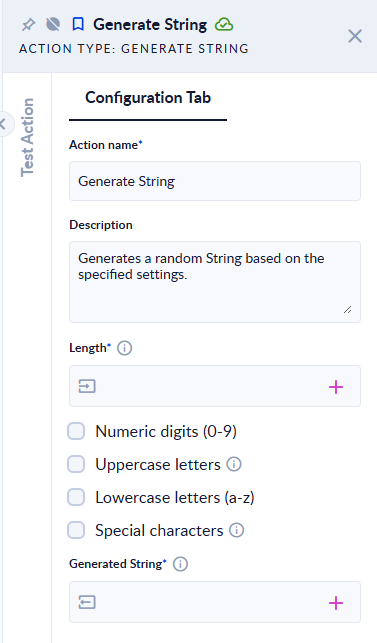
Inputs and outputs
| Field | Direction | Type | Required | What to put / what you get |
|---|---|---|---|---|
| Length | Input | Integer | Yes | How many characters to generate, from 0 to 512. |
| Numeric digits | Input | Boolean (check box) | No | Use 0–9. |
| Uppercase letters | Input | Boolean (check box) | No | Use A–Z. |
| Lowercase letters | Input | Boolean (check box) | No | Use a–z. |
| Special characters | Input | Boolean (check box) | No | Use punctuation and symbols (listed below). |
| Generated String | Output | Text | Yes | The random text. |
Tick at least one character type. The special characters are:
!@#$%^&*()-_=+[]{}|;:'",.<>?/Example
| Length | Ticked | Generated String (one run) |
|---|---|---|
6 | Numeric digits | 538271 |
16 | all four | El(fvH?/x])'/KOL |
0 | Lowercase letters | (empty text) |
6 | none | step fails: At least one checkbox must be active. |
513 | Lowercase letters | step fails: String Length must be lower than 512. |
-3 | Lowercase letters | step fails: An error occurred while generating the string. |
Good to know
- Each character is picked at random from all the ticked types together. A short string is not guaranteed to contain one of each type, so it may not pass a password rule like "at least one digit and one capital".
- The maximum length is
512characters (512 is allowed, 513 is refused). - The text is random, not cryptographically secure: do not use it as a password or a security token.
- Special characters include quotes,
<,>and&. Leave them out if the text goes into a URL, HTML, JSON or a file name.