

Unrar
Extracts the files from a .rar archive.
Unrar opens a .rar archive and gives you the files inside it as a list.
Add the action
In the Process Designer toolbox, open Documents › Archive and pick Unrar (or type Unrar in the search box).
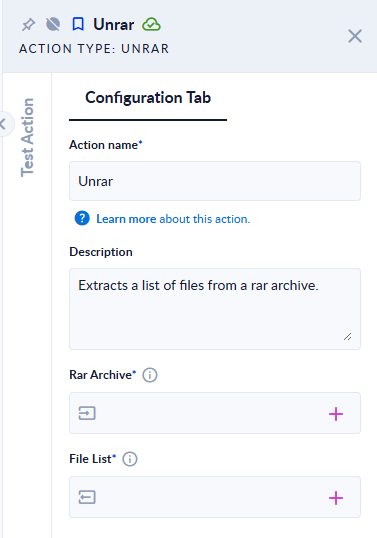
Inputs and outputs
| Field | Direction | Type | Required | What to put / what you get |
|---|---|---|---|---|
| Rar Archive | Input | File | Yes | The .rar file to extract. |
| File List | Output | List of File | Yes | The extracted files. |
Example
| Case | Result |
|---|---|
bundle.rar with a.txt and a folder docs with b.txt | File List a.txt, docsb.txt |
A zip file renamed to notzip.rar | The step fails: "Rar extraction error : Rar signature not found" |
Good to know
- The file name must end in
.rar, otherwise the step fails with "Input error: Archive must have '.rar' extension.". - The action has no password field, so it cannot open a password-protected RAR archive.
- Folders are not kept. A file in a sub-folder comes out at the top level, and its name is the folder name and the file name joined without a separator (
docs/b.txtbecomesdocsb.txt). Empty folders are skipped.