

Key Value
Turns a list of JSON objects into key/value pairs, or pivots them into one JSON object keyed by an attribute.
The Key Value action takes a list of JSON objects and, from each one, reads the attribute you name as the key and the attribute you name as the value. Use it to turn records such as {"code":"RO","label":"Romania"} into a lookup: either a list of {key, value} pairs or, with Pivot data, a single object like {"RO":"Romania"}.
Add the action
In the Process Designer toolbox, open JSON and pick Key Value (or type Key Value in the search box).
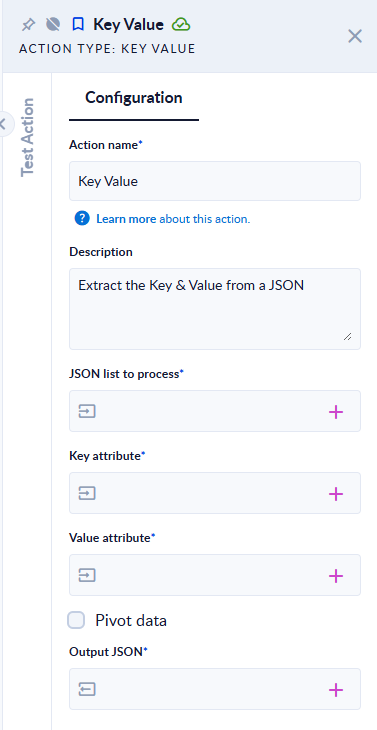
Inputs and outputs
| Field | Direction | Type | Required | What to put / what you get |
|---|---|---|---|---|
| JSON list to process | Input | List of JSON | Yes | A variable holding a list of JSON objects. |
| Key attribute | Input | Text | Yes | The attribute to use as the key, for example code. A path such as meta.id reaches a nested attribute. |
| Value attribute | Input | Text | Yes | The attribute to use as the value, for example label. |
| Pivot data | Input | Boolean (true/false) | No | Off: the output is a list of {"key": …, "value": …} objects. On: the output is one JSON object whose property names are the keys. |
| Output JSON | Output | Any type | Yes | The resulting list or object. |
Example
JSON list to process:
[
  { "code": "RO", "label": "Romania" },
  { "code": "FR", "label": "France" },
  { "code": "RO", "label": "Rumania" }
]
Key attribute code, Value attribute label:
| Pivot data | Output JSON |
|---|---|
| off | [{"key":"RO","value":"Romania"},{"key":"FR","value":"France"},{"key":"RO","value":"Rumania"}] |
| on | {"FR":"France","RO":"Romania","RO (1)":"Rumania"} |
With Pivot data on and the list [{"code":"RO","label":"Romania"},{"code":"FR"},{"label":"NoKey"}], the output is {"FR":null,"RO":"Romania"}: a missing value becomes null and an item without a key is skipped.
A nested path works too: list [{"meta":{"id":"A1"},"info":{"name":"Alpha"}}], Key attribute meta.id, Value attribute info.name → [{"key":"A1","value":"Alpha"}].
Good to know
- Pass the list through a variable (a list of JSON). JSON text typed straight into JSON list to process is refused with
Value could not be converted to property TYPE. - With Pivot data on, a key that appears again gets a counter:
RO,RO (1),RO (2)… - Keys and values are read as text. If a value is itself an object or a list, it comes back as
null. - An empty list, or an empty Key attribute / Value attribute, fails the step with the generic message
Something went wrong.