

String To JSON
Parses a text that contains JSON into a JSON object or a list of JSON values.
The String To JSON action parses a piece of text, such as an API response stored as text or a value typed in a form, into JSON you can work with. A JSON object comes out in Json; a JSON array comes out as a list in Json List.
This action was previously called Parse Json.
Add the action
In the Process Designer toolbox, open JSON and pick String To JSON (or type String To JSON in the search box).
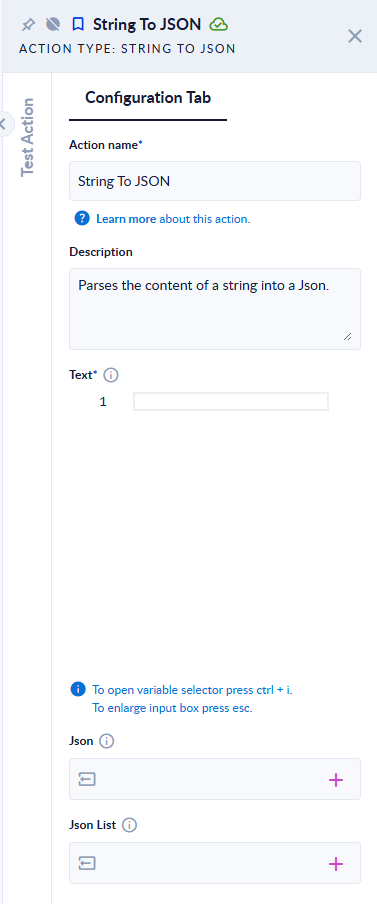
Inputs and outputs
| Field | Direction | Type | Required | What to put / what you get |
|---|---|---|---|---|
| Text | Input | Text | Yes | The text to parse. It must contain a JSON object or a JSON array. |
| Json | Output | JSON | No | The parsed object. Set only when Text holds a JSON object. |
| Json List | Output | List of JSON | No | The items of the parsed array. Set only when Text holds a JSON array. |
Example
| Text | Json | Json List |
|---|---|---|
{"name":"Ana","age":30} | {"age":30,"name":"Ana"} | empty |
[{"id":1},{"id":2}] | empty | [{"id":1},{"id":2}] |
42 | The step fails: Input Error: Input is neither JArray nor JObject ! | |
{"name": | The step fails with the parser's message, for example Unexpected end of content while loading JObject. Path 'name', line 1, position 8. |
Good to know
- Only one of the two outputs is filled. Map both if your text can be either an object or an array.
- A plain number, text or
true/falseis refused: the text must be a JSON object or a JSON array. - To test a text first, use JSON Is Valid and handle its error path.