

Round
Rounds a number to the number of decimal places you choose.
Round rounds a number to the nearest value with the number of decimal places you choose. Use it to show prices with two decimals, to round measurements, or to remove decimals altogether.
Add the action
In the Process Designer toolbox, open Numerical and pick Round (or type Round in the search box).
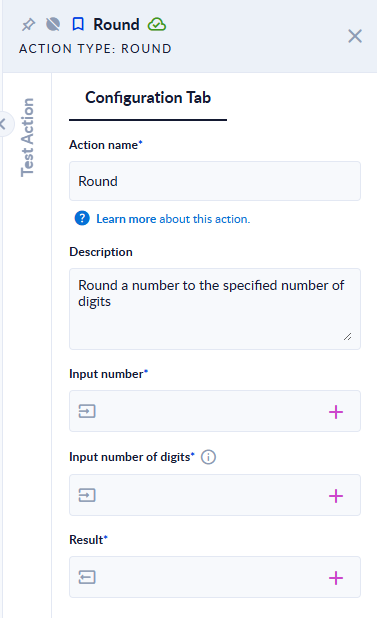
Inputs and outputs
| Field | Direction | Type | Required | What to put / what you get |
|---|---|---|---|---|
| Input number | Input | Number (decimal) | Yes | The number to round. |
| Input number of digits | Input | Integer | Yes | How many decimal places to keep. 0 gives a whole number. A negative value rounds to tens, hundreds… |
| Result | Output | Number (decimal) | Yes | The rounded number. |
Example
| Input number | Input number of digits | Result |
|---|---|---|
3.14159 | 2 | 3.14 |
-2.567 | 1 | -2.6 |
1234.5 | -2 | 1200 |
7 | 2 | 7 |
2.5 | 0 | 2 |
3.5 | 0 | 4 |
-2.5 | 0 | -2 |
1.25 | 1 | 1.2 |
1.005 | 2 | 1 |
Good to know
A number exactly halfway is rounded to the even neighbour ("banker's rounding"), not always up: 2.5 → 2, 3.5 → 4, 1.25 → 1.2. If you need halves of positive numbers to always go up, add a tiny amount (for example 0.0000001) with Add before rounding.
- Some decimals cannot be stored exactly, so a value that looks like a half may be slightly below it:
1.005to 2 digits gives1, not1.01. - Result has no trailing zeros:
7with 2 digits stays7, not7.00. To show7.00, format the number as text when you display it.