

String To Number
Reads a number from text, so you can calculate with it.
String To Number turns text such as "42" or "3.14" into a number you can use in calculations and comparisons. Use it for numbers that arrive as text: form fields, API responses, CSV or Excel cells, email content.
Add the action
In the Process Designer toolbox, open Numerical and pick String To Number (or type String To Number in the search box).
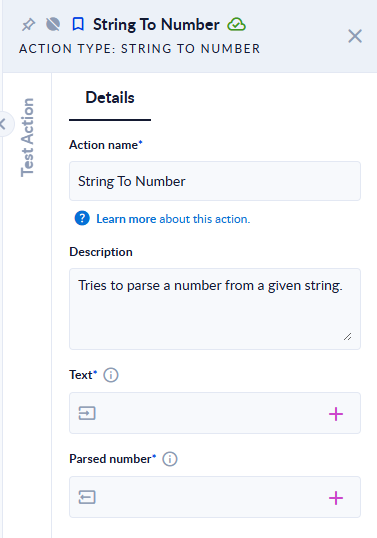
Inputs and outputs
| Field | Direction | Type | Required | What to put / what you get |
|---|---|---|---|---|
| Text | Input | Text | Yes | Text that holds only a number. |
| Parsed number | Output | Number (whole or decimal) | Yes | The number. A whole number when the text has no decimals. |
Example
| Text | Parsed number |
|---|---|
42 | 42 |
3.14 | 3.14 |
-15 | -15 |
12 | 12 (spaces around are ignored) |
1,234.5 | 1234.5 |
.5 | 0.5 |
1e3 | 1000 |
3000000000 | 3000000000 |
abc | step fails: Text can't be parsed to a number. |
12abc | step fails: Text can't be parsed to a number. |
| (empty) | step fails: Text can't be null or empty. |
Good to know
- Use a dot for decimals. A comma is read as a thousands separator, so
1,234.5is1234.5. A European-style3,14does not give3.14; replace the comma with a dot first (for example with a text replace action). - The text must hold a number and nothing else: currency signs, units or words around it make the step fail. Extract the number first if needed.
- When the text is not a number, the step fails; it does not return an empty value. To avoid stopping the process on bad input, check the text before you convert it.