

Delete Bulk
Deletes a list of files from an SFTP or FTP server in one step, over up to 20 parallel connections.
Delete Bulk deletes several files from your SFTP or FTP server in a single step. It takes the list produced by Get File List, for example to clean a folder after its files have been processed. Files that fail don't stop the others: each failure is reported in Errors.
Before you start
The action connects through an FTP credential that you create once in the Credential Manager (host, port, protocol FTP or SFTP, an optional Directory path, and a user name with a password or a key file). See FTP Credential.
Add the action
In the Process Designer toolbox, open SFTP and pick Delete Bulk (or type Delete Bulk in the search box).
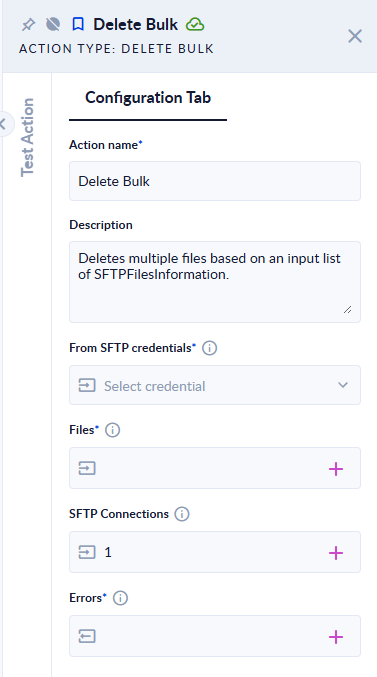
Inputs and outputs
| Field | Direction | Type | Required | What to put / what you get |
|---|---|---|---|---|
| From SFTP credentials | Input | FTP credential | Yes | The credential of the server. |
| Files | Input | List of SFTPFilesInformation | Yes | The files to delete, usually the Output of Get File List. Each entry needs its path. |
| SFTP Connections | Input | Integer | No | How many files are deleted in parallel, from 1 (default) to 20. |
| Errors | Output | List of Text | Yes | One message for each file that could not be deleted. Empty when every file was deleted. |
Example
Files is the list returned by Get File List for the folder processed, SFTP Connections 5 → every file in the list is removed and Errors is [].
The deletion can't be undone. Filter the list from Get File List before you pass it in, so it holds only the files you want to remove.
Good to know
- Entries without a
pathare ignored. - An empty Files list is accepted: the step finishes and Errors is empty.
- Values outside 1–20 in SFTP Connections are brought back to the nearest limit.
- If the connection itself fails, the step fails with "Error while trying to delete files."
- To delete a whole folder, use Delete Folder.