

PDF Is Valid
Checks that a file is a PDF that can be opened, and returns true or false with the reason.
The Is Valid action in the PDF folder checks that a file is a real PDF that can be opened, for example before you merge it, extract its text or store it. Unlike the other Is Valid actions, it does not fail: it returns Validation Output (true or false) and, when the file is not valid, the reason.
Add the action
In the Process Designer toolbox, open PDF and pick Is Valid. The JSON, XML and HTML folders each have an action with the same name, so check the folder.
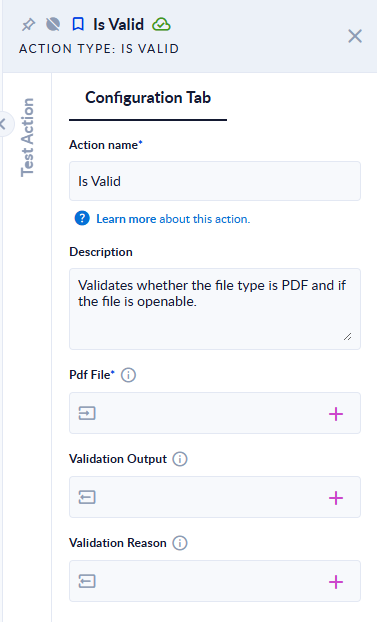
Inputs and outputs
| Field | Direction | Type | Required | What to put / what you get |
|---|---|---|---|---|
| Pdf File | Input | File | Yes | The file to check. |
| Validation Output | Output | Boolean (true/false) | No | true when the file is a PDF that opens correctly, false otherwise. |
| Validation Reason | Output | Text | No | Why the file is not valid. Empty when it is valid. |
Example
| Pdf File | Validation Output | Validation Reason |
|---|---|---|
invoice.pdf, a normal PDF | true | (empty) |
broken.pdf, a text file renamed to .pdf | false | PdfSharpCore: The file is not a valid PDF document. ; UglyToad.PdfPig: Could not find the version header comment at the start of the document. ; iText.Kernel.Pdf: PDF header not found. ; |
notes.txt | false | Input file extension should be '.pdf', found => .txt |
Good to know
- The file must have the
.pdfextension and open correctly in three different PDF readers. If any of them fails, the result isfalseand Validation Reason lists each reader's message. - The step succeeds in every case. Branch on Validation Output with a Decisional action.