

PROCESIO v2.0.8 (2026)
This release adds document signing in forms, the Carousel form element, Data Store queries from form events and credential labels, plus Process Designer improvements and fixes for subprocesses, run history, Call API and forms.
Release Notes — New Features and Improvements
This release adds document signing in forms, a Carousel element for forms, SQL queries on your Data Stores straight from a form event, and labels for credentials, with credentials you can create and prefill without leaving the Process Designer. It also makes the Process Designer easier to use, shows how many sub-workspaces a master workspace has left, and fixes issues in subprocesses, the run history, Call API, Query Store and forms. It was released on 16 November 2026.
New Features
Document signing in forms
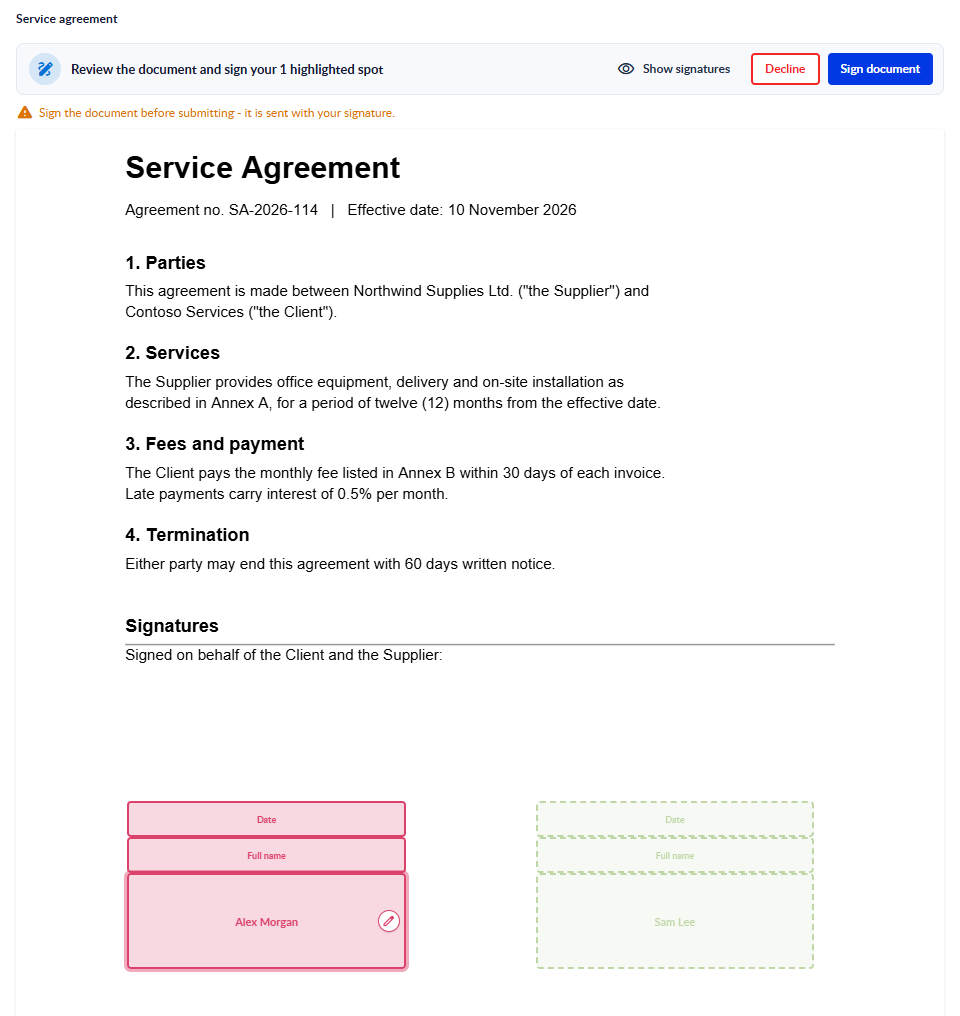
The new Document signing element sends a PDF for signature from a form. Attach the PDF yourself or let the person filling the form drop one, choose who signs and in which order, and place each signer's signature on the document. Signers find the document in Assigned to me, and sign by drawing, uploading an image or typing their name, or decline with a reason. When everyone has signed, PROCESIO produces the signed PDF, which you download from the form's Submissions.
On a public form, the person filling the form signs the document themselves.
Read more in the documentation: Document Signing
Carousel form element
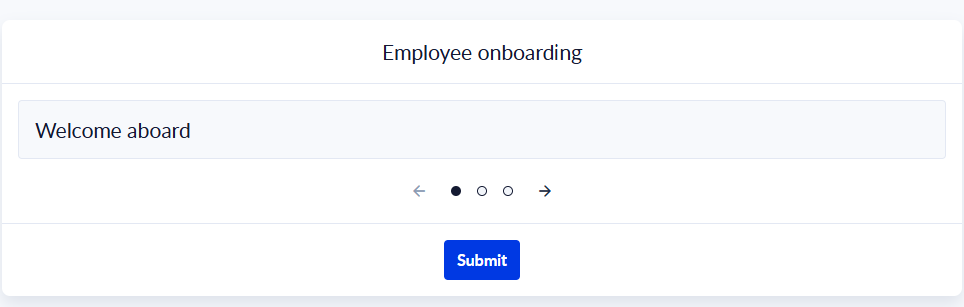
The new Carousel element, in the Structure tab of the Form Designer's Toolbar, shows its content as slides, one at a time. Each slide holds its own form elements. People move between slides with arrows, dots, lines or a counter, the keyboard, or a swipe, and the carousel can also move on its own with Autoplay, every 1 to 60 seconds. You choose the transition effect, react to a slide change with the onSlideChange event, and move between slides from JavaScript with goToNextSlide() and goToPreviousSlide().
Read more in the documentation: Carousel
Run a Data Store query from a form event
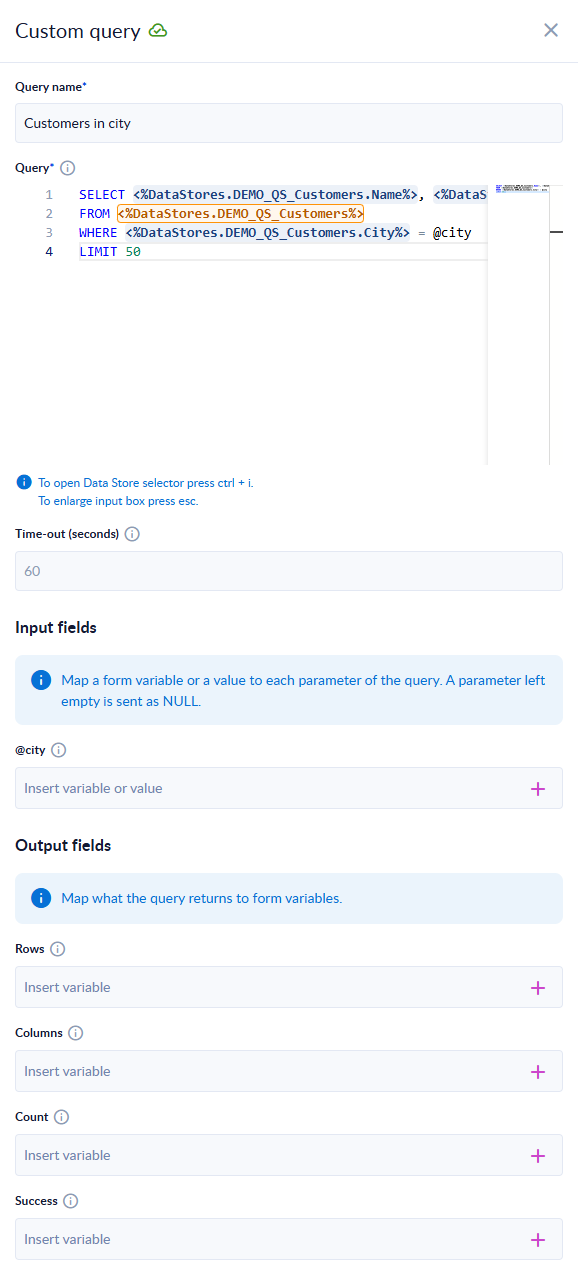
A form event can now run an SQL query on your workspace's Data Stores. In the event, choose Data store operation and then Execute query, and write the query in a SQL editor with a Data Store picker, like the one in the Query Store action. Pass values from the form through @ parameters and map the query's Rows, Columns, Count and Success to form variables. The query stays with the form: people filling it send only the parameter values.
Read more in the documentation: Run a Data Store query
Credential labels, and credentials created from an action
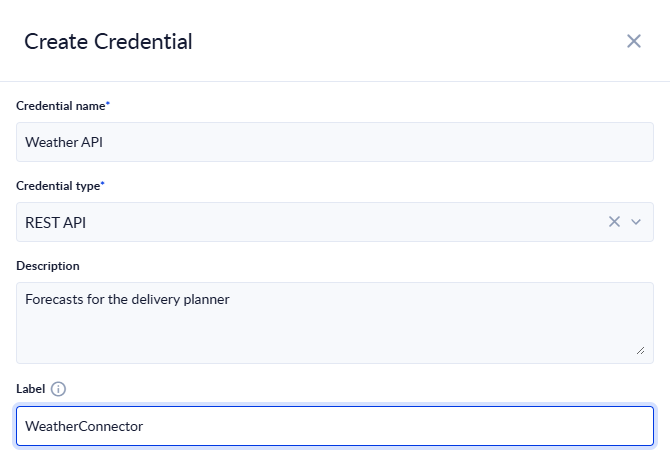
- Label: a credential can now carry a Label that names the connector it is for. Actions that declare a connector type list only the credentials with that label, so you are not offered credentials made for another service.
- Create a credential without leaving the Process Designer: in an action's credential field, click Create Credential. The credential type is already chosen, and when the connector declares the settings its service expects, the new credential comes prefilled with them, label included. Secrets are never prefilled. When you save, the action selects the new credential.
- REST API credentials without a base URL: the URL of a REST API credential is now optional. When you fill it in, it must be a full
httporhttpsaddress, and it is checked when you save. - For custom action authors: a custom action can declare default settings for its credential, which PROCESIO uses to prefill a credential created from the action.
Read more in the documentation: Working with credentials, REST API credential and Custom actions
The sub-workspace limit, before you reach it
The Workspace Management page of a master workspace now shows how many sub-workspaces you have and the limit, for example "12 of 22 sub-workspaces". At the limit, Create workspace is turned off. When a sub-workspace can't be created, or a workspace can't be renamed, the message now gives the real reason instead of a general error.
Read more in the documentation: Create and configure a sub-workspace
Bug Fixes and Improvements
Call API with a credential and a full URL as the endpoint. A full URL on the credential's own host is now used as it is. A full URL on another host is not sent: the step fails with a message that asks for a relative endpoint or a URL on the credential's host. If one of your processes calls another host through a credential, give that host its own credential. See Call API.
Process Designer
- Mac shortcuts: Cmd + click adds an action to the selection, as Ctrl + click does on Windows.
- Esc closes an open right-click menu on an action or a shape.
- Double-click anywhere on an action's row in the Toolbar to add it to the canvas, not only on its icon or name.
- Duplicating a process now confirms it and reminds you that the copy is inactive, or tells you when the copy could not be made.
- Saving an action template now says it was saved and that you will find it in the Toolbar. Add to folder is marked as required.
- Test Action no longer waits forever when its result can't reach you: after 2 minutes it stops and tells you why. See Test an action.
- The breakpoint tooltip now says that the run pauses after the marked action, and the debug buttons are announced correctly by screen readers.
- Hovering over an action that has no description now shows its type.
- The canvas no longer gets stuck unable to drag when the operating system swallows a key release.
- Processes open faster in the Process Designer, and run details open faster.
Processes and run history
- Trigger Subprocess: a subprocess that waits in a Delay or a custom action no longer holds up other runs for up to 30 minutes.
- Run history: a run that read a file from a Data Store row no longer stops other runs from moving to the history once the run that wrote the file is archived.
- Call API: when the request method input holds something that is not a method, the message now says what was received. A REST API credential with no authentication no longer adds a new
User-Agentvalue to every request.
Query Store
- A text user variable can now be compared with a text column, for example
SET @city = 'Cluj'; SELECT * FROM Customers WHERE City = @city. Before, the query failed.
Forms
- Custom CSS on a published form applies as written again: rules for
body,htmland:rootwork and also style the page around the form. In the Form Designer and in Preview, your CSS still styles only the form. See Custom code. - Row filters: when a Data Store row filter mixes and and or, a note now explains that and comes first, and blue brackets show which conditions belong together. See Data Store.
- Document signing on a public form: the person filling the form can sign when the form has no signature spot placed in advance.
- Changing an element's settings now marks the form as changed, so the change can be saved.
- Forms load faster, and form elements work better with the keyboard and screen readers.
Search
- A search that contains the word "download" now finds results in every list.
Summary
New features
- Document signing in forms
- The Carousel form element
- Data Store queries from form events
- Credential labels, credentials created and prefilled from an action, and REST API credentials without a base URL
- The sub-workspace limit on the Workspace Management page, and clearer messages when a workspace can't be created or renamed
Bug fixes and improvements
- Call API with a credential uses a full URL on the credential's host and refuses other hosts: check processes that call another host through a credential
- Process Designer: Mac shortcuts, Esc, clearer messages, a time-out for Test Action, faster loading
- Trigger Subprocess runs no longer hold up other runs, and runs move to the history reliably
- Query Store compares text variables with text columns
- Custom CSS applies as written on published forms, and row filters explain how and and or combine
We will continue improving the PROCESIO experience based on your feedback. Share yours on our Discord channel.
Announcements
Release announcements for PROCESIO — new features, enhancements, and fixes, newest first.
PROCESIO v2.0.7 (2026)
This release adds the Azure Storage connector, workspace renaming, a new Document Designer editor with a side-by-side Code View, links to subprocess runs, and more Query Store power, plus fixes for schedules, processes, Data Store and forms.