

Form Trigger
Creates a new form instance (a task) from one of your form templates, so that the form's assignees can fill it in.
Form Trigger creates a new instance of a form from a form template you built in the Forms & Tasks Designer. It is how a process hands work to people: the new instance goes to the form's first task assignee, who finds it under Assigned to me. Use it, for example, to open an approval task when a process receives a new invoice, or to send an onboarding checklist when a new employee is added.
Form Trigger works in the opposite direction from form events. A form event starts a process when someone submits a form (see Trigger events for form and elements). Form Trigger is a process step that creates a form instance.
Add the action
In the Process Designer toolbox, open Forms and pick Form Trigger (or type Form Trigger in the search box).
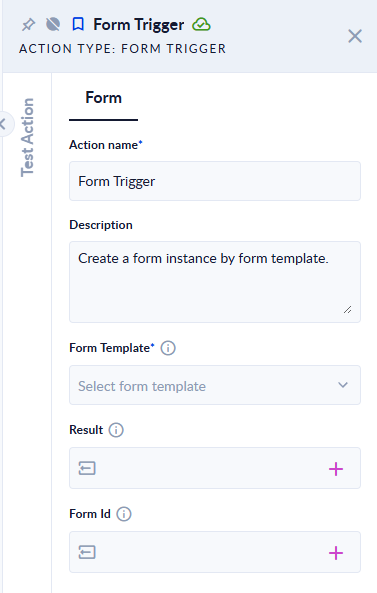
Inputs and outputs
| Field | Direction | Type | Required | What to put / what you get |
|---|---|---|---|---|
| Form Template (Select Form Template in newer versions) | Input | Form | Yes | The form to create an instance of. Pick one of the forms of your workspace. |
| Result (Form successfully triggered in newer versions) | Output | Boolean (true/false) | No | true if the form instance was created, false if not. |
| Form Id | Output | Text (ID) | No | The ID of the new form instance, or empty if it was not created. |
How the new instance is set up
- The instance starts from the form as it is defined in the template: its name, its elements and their settings.
- If the form has task assignees, the instance is placed on the first assignee step (the section, stepper step or tab with the lowest order). Those assignees see it in Assigned to me and, as described in Task Assignees and Approvals, are notified by email.
- The instance is created on behalf of the user who runs the process.
- Once created, the instance behaves like any other form task: it appears in the form's submissions and its events run when assignees submit it.
Example
A process receives an invoice from a webhook, saves it, then uses Form Trigger with Form Template Invoice approval. The form's first step is assigned to the finance team, so a new Invoice approval task appears under Assigned to me for them. Result is true and Form Id holds the new instance's ID; a Decisional on Result sends an alert email when it is false.
Good to know
- A failed creation does not fail the step. When the form instance cannot be created, the step still succeeds, with Result
falseand Form Id empty. Check Result if the rest of your process depends on the task. - The step fails if no form template is selected ("Form template is null") or the selected form cannot be read.
- The form must belong to the same workspace as the process.
- Test Action creates a real form instance. Testing the action is not a dry run: the instance and its task are created and assignees may be notified.
- Form Trigger does not pre-fill the form's fields with process data.
Related pages
- Forms & Tasks Designer, Create form
- Task Assignees and Approvals, Assigned to me, Submissions
- Trigger events for form and elements; the Trigger form event does the same from inside a form, and can also map data into the new form.