

Encrypt To AES256
Encrypts a text with AES using a 256-bit key and returns the result as Base64 and as Hex.
The Encrypt To AES256 action encrypts a text with the AES algorithm and a 256-bit key, for example to protect a value before you store it or send it to a system that decrypts it with the same key. You get the encrypted result in two encodings: Base64 and Hex.
Add the action
In the Process Designer toolbox, open Converters › Cryptographic and pick Encrypt To AES256 (or type AES256 in the search box).
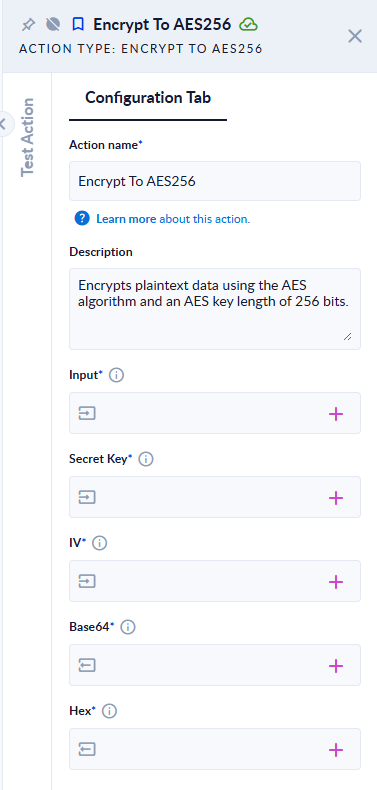
Inputs and outputs
| Field | Direction | Type | Required | What to put / what you get |
|---|---|---|---|---|
| Input | Input | Text | Yes | The text to encrypt. |
| Secret Key | Input | Text | Yes | The key: exactly 32 characters. |
| IV | Input | Text | Yes | The initialization vector: exactly 16 characters. |
| Base64 | Output | Text | Yes | The encrypted result, Base64-encoded. |
| Hex | Output | Text | Yes | The same result, as hexadecimal (upper case). |
Example
Input Hello PROCESIO, Secret Key 12345678901234567890123456789012, IV 1234567890123456 →
Base64 7ZFkdOXkAl7PTq2sHA8knQ==, Hex ED916474E5E4025ECF4EADAC1C0F249D.
A Secret Key of short fails the step with Input Error: Secret Key must be 32 characters long!; an IV of the wrong length fails with Input Error: IV must be 16 characters long!
Good to know
- The action uses AES-256 in CBC mode with PKCS7 padding. The key and IV are read as plain ASCII characters, so stick to letters, digits and common symbols.
- The same text, key and IV always give the same result.
- Decrypt with Decrypt From AES256, using the same Secret Key and IV, and the matching Format (Base64 or Hex).
- Keep the key out of process variables that are logged or shown to users. A credential or a protected configuration value is the safer place.