

Hash Mac
Computes a keyed hash (HMAC) of a text or a file, using a secret key stored as a HashMac Key credential.
The Hash Mac action computes an HMAC: a hash of a text or a file mixed with a secret key. Use it to sign a payload for an API that checks an HMAC signature, or to verify a webhook signature you received. The secret key is kept in a credential, not in the process.
Before you start
Create a credential of type HashMac Key and put your secret key in its password field.
Add the action
In the Process Designer toolbox, open Converters › Cryptographic and pick Hash Mac (or type Hash Mac in the search box).
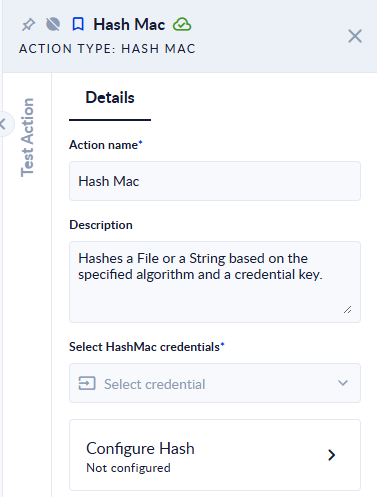
Select the credential, then click Configure Hash to fill in the rest.
Inputs and outputs
| Field | Where | Direction | Type | Required | What to put / what you get |
|---|---|---|---|---|---|
| Select HashMac credentials | Panel | Input | Credential | Yes | The HashMac Key credential that holds the secret key. |
| Input File | Configure Hash | Input | File | No* | The file to hash. |
| Input String | Configure Hash | Input | Text | No* | The text to hash. Ignored when Input File is given. |
| Hash | Configure Hash | Input | Option | Yes | The algorithm: HMACMD5, HMACSHA1, HMACSHA256, HMACSHA3_256, HMACSHA3_384, HMACSHA3_512, HMACSHA384 or HMACSHA512. |
| Result | Configure Hash | Output | Text | Yes | The HMAC as lower-case hexadecimal. |
* Fill one of the two. With both empty, the step fails with Both Input file and string are null or empty.
Good to know
- The text and the secret key are both read as UTF-8, and the result is lower-case hex. If the receiving system expects Base64, convert the hex accordingly.
- A credential with an empty password fails the step with
Credential password is null or empty. - Most APIs that sign requests use
HMACSHA256. Check what the other system expects, including exactly which text is signed (body only, or body plus a timestamp). - Without a key, use Hash.