

Hash
Computes the hash of a text or a file with MD5, SHA-1, SHA-2 or SHA-3, as lower-case hex.
The Hash action computes a fingerprint (hash) of a text or a file. Use it to compare files without opening them, to detect changes, or to produce the checksum another system asks for.
Add the action
In the Process Designer toolbox, open Converters › Cryptographic and pick Hash (or type Hash in the search box).
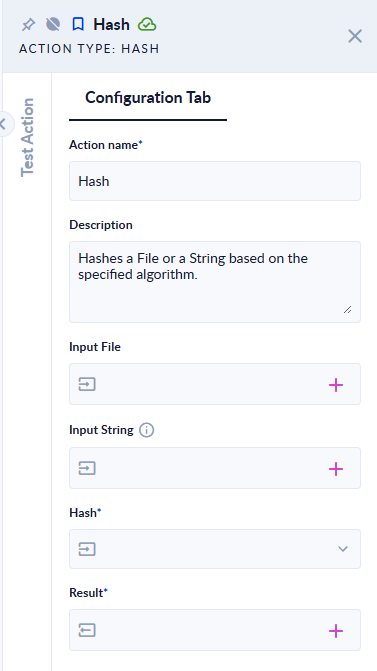
Inputs and outputs
| Field | Direction | Type | Required | What to put / what you get |
|---|---|---|---|---|
| Input File | Input | File | No* | The file to hash. |
| Input String | Input | Text | No* | The text to hash. Ignored when Input File is given. |
| Hash | Input | Option | Yes | The algorithm: MD5, SHA1, SHA256, SHA3_256, SHA3_384, SHA3_512, SHA384 or SHA512. |
| Result | Output | Text | Yes | The hash as lower-case hexadecimal. |
* Fill one of the two. With both empty, the step fails with Both file and string are null. Please check again the inputs.
Example
| Input | Hash | Result |
|---|---|---|
Input String hello | SHA256 | 2cf24dba5fb0a30e26e83b2ac5b9e29e1b161e5c1fa7425e73043362938b9824 |
Input String hello | MD5 | 5d41402abc4b2a76b9719d911017c592 |
Input File notes.txt (content hello), Input String ignored | SHA256 | 2cf24dba5fb0a30e26e83b2ac5b9e29e1b161e5c1fa7425e73043362938b9824 |
Good to know
- A text is hashed as UTF-8 bytes, so the result matches the same text hashed by most other tools.
- A file is hashed byte for byte, so a text file and the same text typed in Input String give the same hash.
- MD5 and SHA-1 are fine for checksums, but too weak for security purposes. Prefer SHA-256 or stronger.
- To hash with a secret key (HMAC), use Hash Mac.