

HTML To JSON
Converts an HTML text into a JSON tree of elements, texts and attributes.
The HTML To JSON action turns HTML into a JSON tree that describes every element, its attributes and its text. Use it to read values out of an HTML page or email with the JSON actions, or to change the structure and rebuild the HTML with JSON To HTML.
Add the action
In the Process Designer toolbox, open Converters and pick HTML To JSON (or type HTML To JSON in the search box).
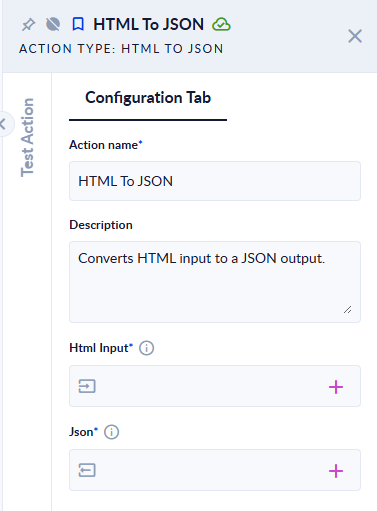
Inputs and outputs
| Field | Direction | Type | Required | What to put / what you get |
|---|---|---|---|---|
| Html Input | Input | Text | Yes | The HTML to convert. |
| Json | Output | JSON | Yes | The JSON tree (see below). |
The JSON tree
Every node of the tree has the same properties:
| Property | What it holds |
|---|---|
NodeType | Document (the top node), Element, Text or Comment. |
Tag | The tag name in lower case (div, p), #text for a text node, null for the top node. |
Text | The element's own text (not its children's), or null. |
Attributes | The attributes as an object. class is split into a list of class names. |
Children | The child nodes, in order. |
Example
Html Input <div class="card main"><p id="t">Hello</p></div> → Json:
{
  "NodeType": "Document", "Tag": null, "Text": null, "Attributes": {},
  "Children": [
    {
      "NodeType": "Element", "Tag": "div", "Text": null,
      "Attributes": { "class": ["card", "main"] },
      "Children": [
        {
          "NodeType": "Element", "Tag": "p", "Text": "Hello",
          "Attributes": { "id": "t" },
          "Children": [
            { "NodeType": "Text", "Tag": "#text", "Text": "Hello", "Attributes": {}, "Children": [] }
          ]
        }
      ]
    }
  ]
}
Html Input <div><p>Hello</div> → the step fails: HTML is not valid. Validation Errors: Error at Line 1, Column 5 - End tag </p> was not found
Good to know
- The HTML is checked first, like HTML Is Valid does: a tag that is not closed fails the step.
- Text nodes that contain only spaces or line breaks are left out.
- An element's text appears twice: in its own
Textand in its#textchild. Read whichever suits your query.