

JSON To HTML
Builds an HTML text from a JSON tree of elements, texts and attributes.
The JSON To HTML action builds HTML from a JSON description of its elements. It reads the format that HTML To JSON produces, so you can convert HTML to JSON, change it, and turn it back. You can also write the JSON yourself to generate HTML from process data.
Add the action
In the Process Designer toolbox, open Converters and pick JSON To HTML (or type JSON To HTML in the search box).
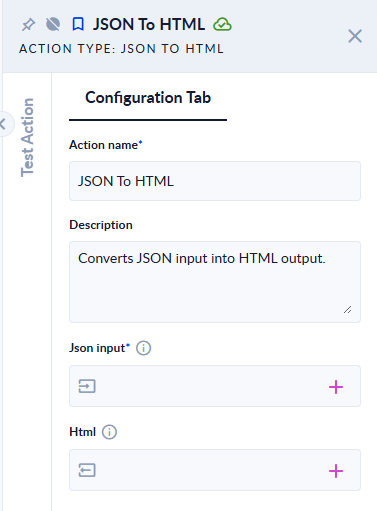
Inputs and outputs
| Field | Direction | Type | Required | What to put / what you get |
|---|---|---|---|---|
| Json input | Input | JSON | Yes | A variable holding one node (a JSON object) or a list of nodes (a JSON array). |
| Html | Output | Text | No | The resulting HTML. |
The JSON format
Each node is an object with these properties (names are not case-sensitive):
| Property | What it does |
|---|---|
nodeType | Element, Text or Comment. A Document node is skipped and only its children are used. Without nodeType, a node is treated as an element. |
tag | The element's tag, for example p. Required for an element. |
text | The text of a Text or Comment node. |
attributes | An object of attributes. class must be a list, for example ["card", "main"]. |
children | A list of child nodes. |
Example
Json input:
{
  "nodeType": "Element", "tag": "div",
  "attributes": { "class": ["card", "main"] },
  "children": [
    { "nodeType": "Element", "tag": "p", "attributes": { "id": "t" },
      "children": [ { "nodeType": "Text", "text": "Hello" } ] }
  ]
}
Html <div class="card main"><p id="t">Hello</p></div>
| Json input | Html |
|---|---|
[{"tag":"h1","children":[{"nodeType":"Text","text":"Title"}]},{"tag":"p","children":[{"nodeType":"Text","text":"Body"}]}] | <h1>Title</h1><p>Body</p> |
The output of HTML To JSON for <div class="card main"><p id="t">Hello</p></div> | <div class="card main"><p id="t">Hello</p></div> |
{"foo":"bar"} | The step fails: Couldn't convert JSON to HTML. Make sure JSON is in the expected format. |
Good to know
- Pass the JSON through a variable of type JSON. JSON typed straight into the Json input field is read as plain text and the step fails with
Couldn't convert JSON to HTML. Make sure JSON is in the expected format. - An element without
tag, or a text node withouttext, is silently left out. - Tag names are written in lower case.