

Split Workbook To CSV
Splits one sheet of a workbook into several .csv files with a fixed number of rows each.
Split Workbook To CSV reads one sheet of a workbook and writes it out as several .csv files, each with a fixed number of rows. Use it to feed a large spreadsheet, in batches, to a system that imports CSV.
Add the action
In the Process Designer toolbox, open Excel and pick Split Workbook To CSV (or type Split Workbook To CSV in the search box).
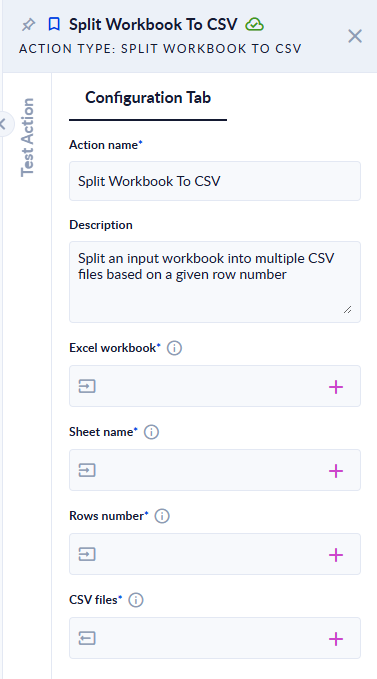
Inputs and outputs
| Field | Direction | Type | Required | What to put / what you get |
|---|---|---|---|---|
| Excel workbook | Input | File | Yes | The .xlsx or .xlsm workbook to split. |
| Sheet name | Input | Text | Yes | The sheet to split. Upper or lower case does not matter. |
| Rows number | Input | Integer | Yes | How many rows go in each file, from 1 to 10000. |
| CSV files | Output | List of File | Yes | The parts, in order. |
Example
orders.xlsx, sheet Orders:
| A | B | C | D | |
|---|---|---|---|---|
| 1 | Product | Qty | Price | Total |
| 2 | Pen | 2 | 1.5 | =B2*C2 (shows 3) |
| 3 | Book | 1 | 12 | =B3*C3 (shows 12) |
| 4 | Mug | 3 | 4.25 | =B4*C4 (shows 12.75) |
Rows number 2 → CSV files:
| File | Content |
|---|---|
orders(Part1).csv | Product,Qty,Price,Total / Pen,2,1.5,3.0 |
orders(Part2).csv | Book,1,12,12 / Mug,3,4.25,12.75 |
With Rows number 10 the whole sheet fits in one file, orders(Part1).csv.
Good to know
- The rows are counted from the first row of the sheet, header included. The header is not repeated in the later files.
- Formula cells are written with their last calculated value, as stored in the file.
- Numbers are written as stored in the file, which can differ from what Excel displays (for example
3.0instead of3). - A value that contains a comma, a quote or a line break is wrapped in double quotes.
- The files are UTF-8 with a byte order mark (BOM), comma-separated, with Unix line breaks (LF).
- Completely empty rows are skipped.
- To get
.xlsxparts instead, use Split Workbook.