

Add
Adds a value or an object to the end of a list.
The Add action (List) appends one element to the end of a list. The same list variable is used as input and output, so after the step the variable holds the longer list. Use it inside a loop to collect results, for example one row per processed file.
Add the action
In the Process Designer toolbox, open List and pick Add (or type Add in the search box — make sure you pick the one in the List folder, not the numerical Add).
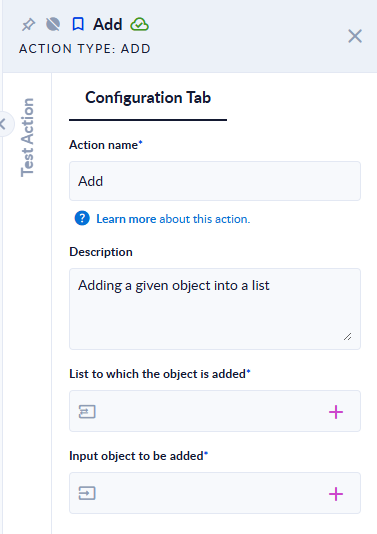
Inputs and outputs
| Field | Direction | Type | Required | What to put / what you get |
|---|---|---|---|---|
| List to which the object is added | Input and output | List of any type | Yes | The list variable to extend. After the step, the same variable contains the list with the new element at the end. |
| Input object to be added | Input | Any value (text, number, Boolean, Object (JSON), data model) | Yes | The element to append. |
Example
| List to which the object is added (before) | Input object to be added | List to which the object is added (after) |
|---|---|---|
[1,2] | 3 | [1,2,3] |
["a","b"] | b | ["a","b","b"] (duplicates are allowed) |
[] | x | ["x"] |
[{"id":1,"name":"Ann"}] | {"id":2,"name":"Bob"} | [{"id":1,"name":"Ann"},{"id":2,"name":"Bob"}] |
Good to know
- The element is always added at the end. Duplicates are not checked; use Contains first if you need unique values.
- If the list variable is empty or has no value yet, the action starts a new list.
- Because the list is both input and output, map a variable (not a fixed value) to List to which the object is added, otherwise you cannot read the result.
- To add a data model or JSON object, pass the object itself (or a variable of that data model). Keep all elements of one list the same shape if you plan to Filter or Sort Data Model it later.