

Sublist
Extracts part of a list, starting at a given index and spanning a given number of elements.
The Sublist action copies a slice of a list: it starts at a given position and takes a given number of elements. Use it to process a list in pages or batches (for example elements 0–99, then 100–199).
Add the action
In the Process Designer toolbox, open List and pick Sublist (or type Sublist in the search box).
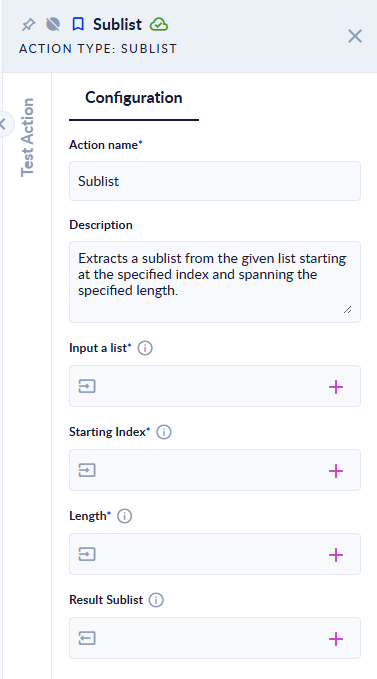
Inputs and outputs
| Field | Direction | Type | Required | What to put / what you get |
|---|---|---|---|---|
| Input a list | Input | List of any type | Yes | The list from which a sublist will be extracted. |
| Starting Index | Input | Integer | Yes | Zero-based index of the first element to include (0 = first element). |
| Length | Input | Integer | Yes | The number of elements to include. |
| Result Sublist | Output | List (same type as the input) | No | The extracted elements. |
Example
| Input a list | Starting Index | Length | Result Sublist |
|---|---|---|---|
["a","b","c","d","e"] | 1 | 3 | ["b","c","d"] |
["a","b","c","d","e"] | 3 | 10 | ["d","e"] (stops at the end of the list) |
["a","b"] | 0 | 0 | [] |
[{"id":1},{"id":2},{"id":3}] | 0 | 2 | [{"id":1},{"id":2}] |
["a","b"] | 2 | 1 | The step fails: Index exceeds the list's size. |
[] | 0 | 1 | The step fails: Input was null or empty. |
["a","b"] | -1 or length -1 | The step fails: An error occured while extracting the sublist. |
Good to know
- A Length larger than what is left is allowed: you get the elements up to the end of the list.
- Starting Index must point to an existing element (from
0to length − 1). Negative values are not allowed. - An empty list makes the step fail.
- The input list is not changed.