

Contains
Checks whether a list contains a given value or object and returns true or false.
The Contains action (List) searches a list for a value and returns true if it is found, false if not. Use it before a Decisional to branch on whether an item is already in a list.
Add the action
In the Process Designer toolbox, open List and pick Contains (or type Contains in the search box — make sure you pick the one in the List folder, not the String one).
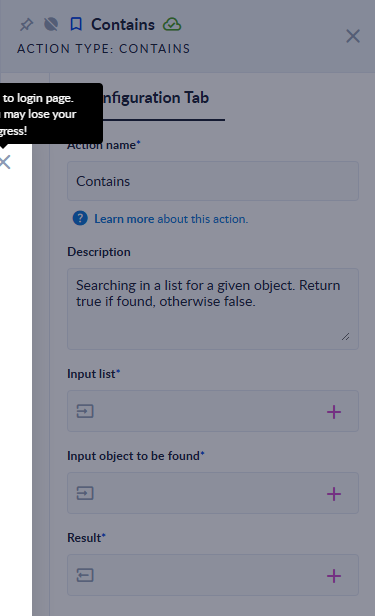
Inputs and outputs
| Field | Direction | Type | Required | What to put / what you get |
|---|---|---|---|---|
| Input list | Input | List of any type | Yes | The list to search. |
| Input object to be found | Input | Any value (text, number, Boolean, Object (JSON), data model) | Yes | The value to look for. |
| Result | Output | Boolean (true/false) | Yes | true if the list contains the value, otherwise false. |
Example
| Input list | Input object to be found | Result |
|---|---|---|
[1,2,3] | 2 | true |
[1,2,3] | 9 | false |
["Apple","pear"] | pear | true |
["Apple","pear"] | apple | false (text comparison is case-sensitive) |
[1.5,2] | 1.5 | true |
[true,false] | true | true |
[{"id":1,"name":"Ann"},{"id":2,"name":"Bob"}] | {"name":"Bob","id":2} | true (property order does not matter) |
[{"id":1,"name":"Ann"}] | {"id":1} | false (the whole object must match) |
[] | 9 | false |
[1] | (empty) | The step fails: Input was null. Please, fill it. |
Good to know
- Text is compared exactly, including upper/lower case.
- A number matches the same number written as text (
2and"2"). - Objects and data models match only when all properties and values are equal; the order of the properties does not matter. A partial object does not match.
- An empty Input object to be found makes the step fail. An empty list simply returns
false.