

Replace EOL
Turns the text sequences \n, \r and \t into real line breaks and tabs, or real line breaks and tabs back into \n, \r and \t.
Replace EOL converts line breaks and tabs in both directions:
- the two-character text sequences
\n,\rand\t(a backslash followed by a letter) become a real new line, carriage return and tab, or - real new lines, carriage returns and tabs become the text sequences
\n,\rand\t.
Use the first direction when a value arrives with escaped line breaks (for example from a JSON string or an API) and you want real lines in an email or a document. Use the second to put a multi-line text on one line, for example before you send it inside a JSON body or write it to a CSV cell.
Add the action
In the Process Designer toolbox, open String and pick Replace EOL (or type Replace EOL in the search box).
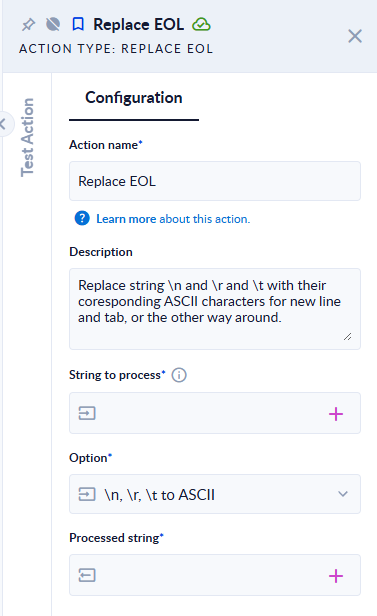
Inputs and outputs
| Field | Direction | Type | Required | What to put / what you get |
|---|---|---|---|---|
| String to process | Input | Text | Yes | The text to convert. |
| Option | Input | List of choices | Yes | \n, \r, \t to ASCII (the default): text sequences become real characters. ASCII to \n, \r, \t: real characters become text sequences. |
| Processed string | Output | Text | Yes | The converted text. |
Example
| String to process | Option | Processed string |
|---|---|---|
Line one\nLine two\tTabbed (typed with backslashes) | \n, \r, \t to ASCII | Line one + new line + Line two + tab + Tabbed |
Line one + new line + Line two + tab + Tabbed | ASCII to \n, \r, \t | Line one\nLine two\tTabbed |
A + Windows line break (carriage return + new line) + B | ASCII to \n, \r, \t | A\r\nB |
A\r\nB (typed with backslashes) | \n, \r, \t to ASCII | A + carriage return + new line + B |
Good to know
- Only
\n,\rand\tare converted. Other escape sequences, such as\"oré, are left as they are. - A Windows line break is two characters (carriage return + new line), so it becomes
\r\n, not\n. - If String to process is empty, Processed string is empty.